KQL THREAT HUNTING
KQL Queries for Threat Hunting: 8 Patterns With Examples
Eight KQL hunting patterns you can paste and adapt, from encoded PowerShell and rare parent processes to click-then-execute joins and inbox rules, with a worked example that predicts each output before you run it.
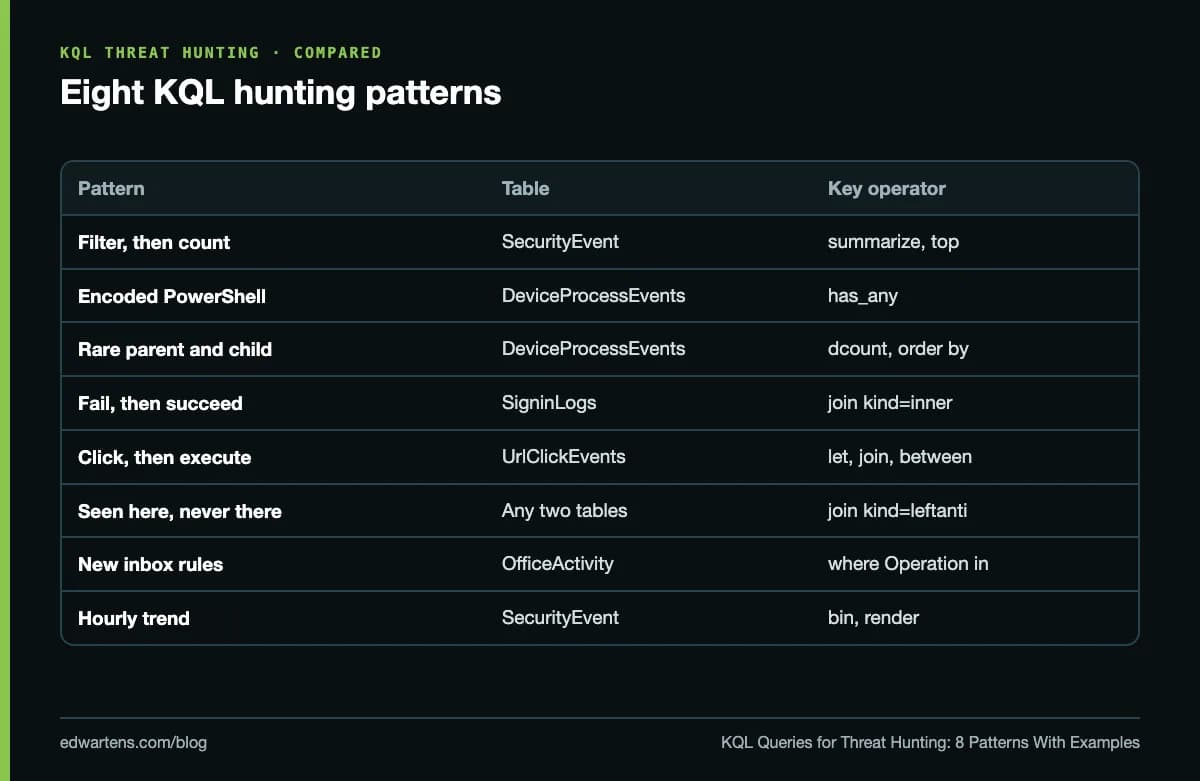
KQL queries for threat hunting are read-only Kusto Query Language searches that you run in Microsoft Defender Advanced Hunting, Microsoft Sentinel or Log Analytics to look for attacker behaviour your detections have not flagged: each starts from a table such as DeviceProcessEvents or SigninLogs, filters on time first, narrows to the behaviour in your hypothesis, then aggregates or joins so that the rare and suspicious rows stand out. The eight patterns below (filter and count, encoded commands, rare pairs, fail-then-succeed, click-then-execute, never-seen-elsewhere, mailbox rules and time charts) cover most hunts an analyst runs, and each is a single line you can paste and adapt.
Behaviour of KQL operators and Advanced Hunting was checked on Microsoft Learn in October 2026. Microsoft, Defender and Sentinel are Microsoft's trademarks; EDWartens is not a Microsoft training partner. Run these queries only in a tenant you are authorised to use.
How a hunting query reads
Microsoft's KQL overview describes a Kusto query as a read-only request to process data and return results: it never writes data. A query starts with a table and passes it through operators joined by the pipe character, each taking a table in and handing a table out, so you read it top to bottom like a recipe.
Two details trip people up. Sentinel and Log Analytics tables carry the event time in TimeGenerated, while Defender XDR tables in Advanced Hunting use Timestamp. And Advanced Hunting, according to Microsoft's Advanced Hunting overview, lets you explore up to 30 days of raw Defender XDR data, plus Sentinel analytics-tier data under the workspace's own retention once a workspace is connected. Hunts that need months of history belong in the Sentinel data lake, with KQL jobs or notebooks.
| Operator | What it does | Hunting use |
|---|---|---|
| where | Keeps rows that match | Time window, event type, suspicious value |
| project | Keeps and orders named columns | Readable output for the hunt record |
| extend | Adds a calculated column | Hour of day, lower-case names, parsed fields |
| summarize | Groups and aggregates | Counts per account, distinct hosts per user |
| top | Sorts and keeps the first N | The ten noisiest or rarest values |
| join | Matches rows from two tables | Click then execution, fail then success |
| has | Matches a whole indexed term | Fast search inside long command lines |
| bin | Rounds time into buckets | Hourly or daily trends |
Eight patterns, one line each
1. Filter, then count. Failed Windows sign-ins in the last day, by account:
SecurityEvent | where TimeGenerated > ago(1d) | where EventID == 4625 | summarize Failures = count() by Account | top 10 by Failures
2. Encoded PowerShell on endpoints. A classic first hunt (ATT&CK T1059.001):
DeviceProcessEvents | where Timestamp > ago(7d) | where FileName in~ ("powershell.exe", "pwsh.exe") | where ProcessCommandLine has_any ("-enc", "-encodedcommand") | project Timestamp, DeviceName, AccountName, ProcessCommandLine
3. Rare parent and child processes. Stack counting finds what is unusual across the estate:
DeviceProcessEvents | where Timestamp > ago(7d) | summarize Hosts = dcount(DeviceName), Runs = count() by InitiatingProcessFileName, FileName | where Hosts <= 2 | order by Runs asc
4. Failed, then successful, from the same place. Password guessing that worked:
let fails = SigninLogs | where TimeGenerated > ago(1d) and ResultType != "0" | project FailTime = TimeGenerated, UserPrincipalName, IPAddress; SigninLogs | where TimeGenerated > ago(1d) and ResultType == "0" | join kind=inner fails on UserPrincipalName, IPAddress | where TimeGenerated between (FailTime .. (FailTime + 1h))
5. Click, then execute. Encoded PowerShell within an hour of an allowed phishing-link click:
let clicks = UrlClickEvents | where Timestamp > ago(7d) and ActionType == "ClickAllowed" | project ClickTime = Timestamp, AccountUpn; DeviceProcessEvents | where Timestamp > ago(7d) | where ProcessCommandLine has_any ("-enc", "-encodedcommand") | join kind=inner clicks on AccountUpn | where Timestamp between (ClickTime .. (ClickTime + 1h))
6. Seen here, never there. A leftanti join returns left rows with no match on the right, for example devices that ran a file hash with no matching antivirus detection for it. Put the executions on the left and the detections on the right, both filtered to the same window.
7. New mailbox rules. Business email compromise often hides replies with an inbox rule:
OfficeActivity | where TimeGenerated > ago(7d) | where Operation in ("New-InboxRule", "Set-InboxRule") | project TimeGenerated, UserId, ClientIP, Parameters
8. A trend you can see. Hourly failed sign-ins as a chart:
SecurityEvent | where TimeGenerated > ago(1d) and EventID == 4625 | summarize Failures = count() by bin(TimeGenerated, 1h) | render timechart
Column names differ between tables and tenants, so check the schema pane before you run a join. In DeviceProcessEvents the user principal name column is AccountUpn.
Worked example: predict the output before you run it
Good hunters can say what a query will return before pressing run. Three checks from the SC-200 course notes:
Aggregation. A lab table has six rows (computer, event ID, account): SRV01 4625 alice, SRV01 4625 alice, SRV01 4624 alice, SRV01 4625 bob, WS07 4625 carol, WS07 4624 dave. The query summarize Failures = countif(EventID == 4625), Accounts = dcount(Account) by Computer returns two rows. SRV01 has three 4625 rows, so Failures = 3, and two distinct accounts (alice, bob), so Accounts = 2. WS07 has one 4625 row and two accounts (carol, dave): Failures = 1, Accounts = 2. Note that dcount counts accounts from every row in the group, whatever the event.
Joins. The left table has one row each for alice, bob and carol; the right table has two rows for alice and one for dave.
| Join kind | Rows returned | Why |
|---|---|---|
| inner | 2 | alice matches two right rows |
| leftouter | 4 | two for alice, plus bob and carol with empty right columns |
| leftanti | 2 | bob and carol have no match |
| rightanti | 1 | dave has no match |
| fullouter | 5 | two matched, plus bob, carol and dave |
The join operator page gives innerunique as the default kind, which removes duplicate keys from the left table before matching; here it also returns 2, because the left keys are already unique.
Time buckets. A query over ago(1d) that summarizes by bin(TimeGenerated, 1h) can return up to 25 rows, not 24: the one-day window rarely starts on the hour, so it touches part of the first hour, 23 whole hours and part of the current one. Empty hours return no row at all.
Make queries fast and cheap
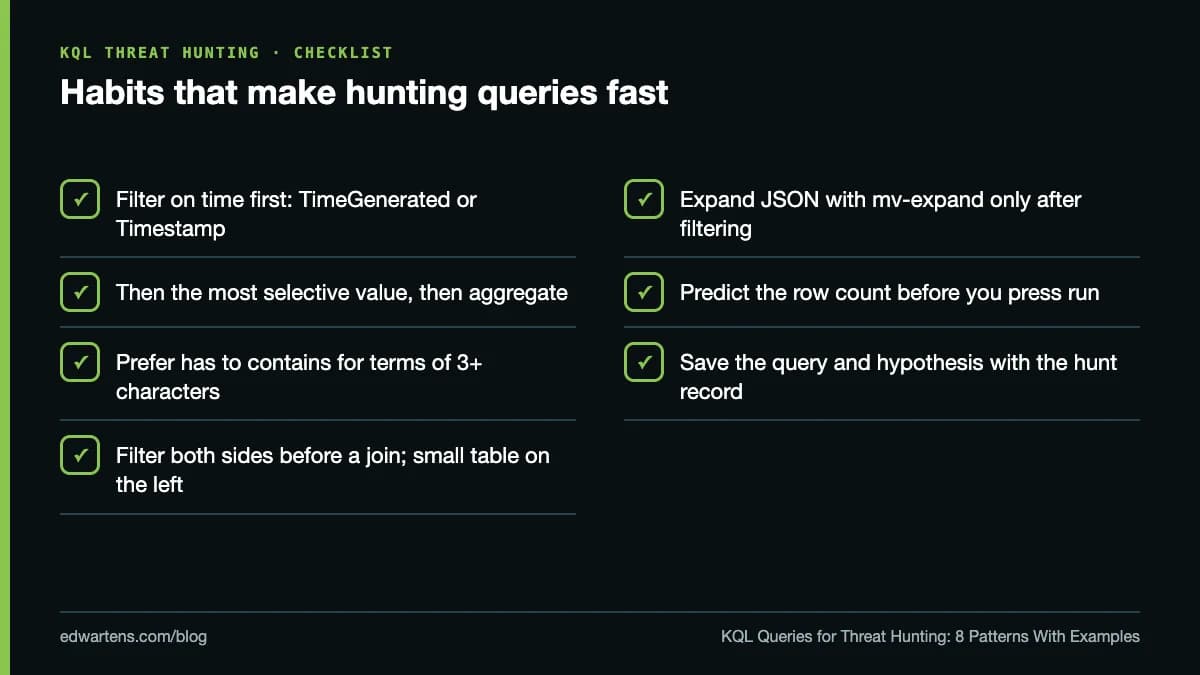
- Filter on time first, then on the most selective value, then aggregate or join. Each step shrinks the table the next one reads.
- Prefer has to contains. Microsoft's has operator page explains that has looks up indexed terms of three or more characters, while shorter terms and contains have to scan the values.
- Filter both sides before a join, put the smaller table on the left, and expand JSON arrays with mv-expand only after filtering, because it multiplies rows.
From hunt to detection
A hunt that finds nothing is still useful if you write it down: the hypothesis, the query, the time range, the data you could and could not see. A hunt that finds something becomes a bookmark attached to an incident, and then a scheduled analytics rule or a Defender XDR custom detection so the same behaviour alerts next time. Map the rule to an ATT&CK technique and test it for a week as a plain alert before you attach any automatic action.
If Security Copilot or another assistant drafts a query for you, read every line, run it on a narrow window and check the table, filters and row counts make sense. Our post on what generative AI can and cannot do for technical work explains why that check matters.
Practise free, then prepare for SC-200
You can practise KQL operators at no cost on the Azure Data Explorer help cluster's Samples database with a Microsoft account, then move to a lab workspace with the Microsoft Sentinel free trial for security tables. KQL also runs through all three skill areas of Microsoft's SC-200 exam, whose study guide lists the skills measured as of 21 October 2026, with threat hunting at 20-25%. If you are studying alongside a job, our tips on actually finishing a free online course help.
The free Microsoft Sentinel and Defender: SC-200 Exam Prep course teaches KQL from the first query to hunting across two full modules, then uses it for detections, automation and data lake hunts, with original worked problems and original practice questions rather than exam dumps. It is a free course with a verifiable certificate of completion, and anyone can check a certificate on our verification page. It is not the Microsoft certification, which only Microsoft awards after its own exam, and EDWartens is not affiliated with Microsoft. Start the KQL and SC-200 course.
Take the free course


Questions
What is KQL used for in threat hunting?
KQL (Kusto Query Language) is the read-only query language behind Microsoft Defender Advanced Hunting, Microsoft Sentinel and Log Analytics. Hunters use it to filter, aggregate and join security tables such as DeviceProcessEvents and SigninLogs to find attacker behaviour that no alert has flagged.
What is the difference between has and contains in KQL?
has matches a whole indexed term and is fast for terms of three or more characters; contains matches any substring and has to scan every value. Use has for words in command lines and URLs, and contains only when has cannot work.
What is the default join kind in KQL?
The default is innerunique, which removes duplicate keys from the left table before matching. Name the kind explicitly, for example kind=inner or kind=leftanti, so the query does what you expect.
How far back can Advanced Hunting search?
Microsoft's documentation says Advanced Hunting explores up to 30 days of raw Defender XDR data, plus Microsoft Sentinel analytics-tier data under the workspace's own retention once a workspace is connected. Longer hunts belong in the Sentinel data lake.
Where can I practise KQL for free?
The Azure Data Explorer help cluster has a free Samples database you can query with a Microsoft account. Move to a lab workspace with the Microsoft Sentinel free trial for security tables, and delete lab resources when you finish.
Is there a free KQL and SC-200 course with a certificate?
Yes. Microsoft Sentinel and Defender: SC-200 Exam Prep on EDWartens is a free course with a verifiable certificate of completion that teaches KQL from the first query to hunting. It is not the Microsoft certification, which only Microsoft awards after its own exam.
Sources
- Microsoft Learn: Kusto Query Language overview (read 11 October 2026)
- Microsoft Learn: has operator (read 11 October 2026)
- Microsoft Learn: join operator (read 11 October 2026)
- Microsoft Learn: Advanced hunting overview (read 11 October 2026)
- Microsoft Learn: SC-200 study guide, skills measured as of 21 October 2026 (read 11 October 2026)
Written by the EDWartens engineering team for general education. Product names are trademarks of their owners; mentioning them does not imply endorsement. Prices and terms of other providers were checked on the date shown and can change.
Wazuh vs Splunk: Which SIEM to Learn and Run in 2026

Controls Engineer Certifications: CAP, CCST and More

Do Online Courses Count as CPD or PDH for Engineers?

Electrical QA/QC Engineer: Duties, ITPs and Certifications

How to Become a Controls Engineer: A 2026 Roadmap

Thermography Certification Levels 1, 2 and 3 Explained