Online · Free
Generative AI and Prompt Engineering Internship
8 short weeks. Free. Start any date.
By Wartens Ltd (UK), delivered through EDWartens.
- Free
- Online
- Any start date
- 1 to 8 weeks
Who it suits
Made for beginners.
- Students of any branch who want to use AI well in study and work.
- Anyone who wants to write clear prompts, check the answers and avoid the common traps.
- Read the notes on a phone, a tablet or a laptop.
What you will learn
Eight weeks, one picture each
Week 1
What generative AI is and is not
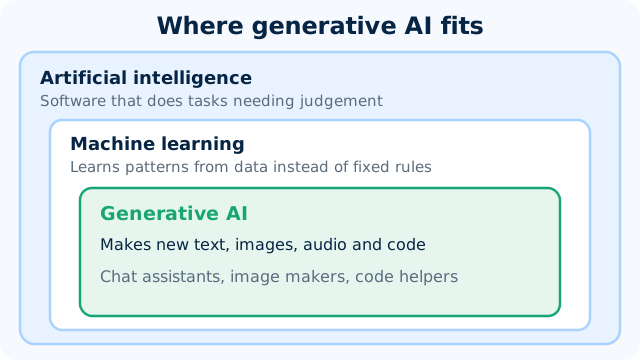
Say what generative AI does well, where it goes wrong, and how it differs from a search engine.
Week 2
How LLMs work
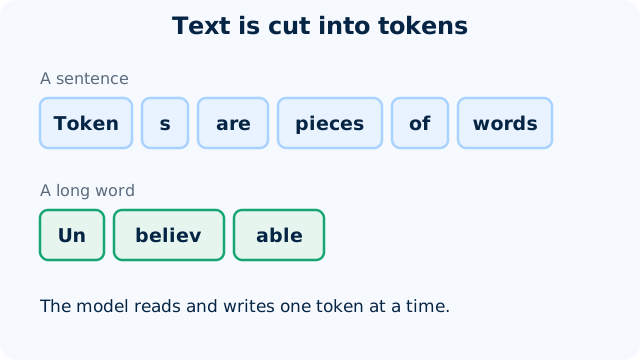
Explain tokens, the context window, next-token prediction and temperature in plain words.
Week 3
Prompting fundamentals
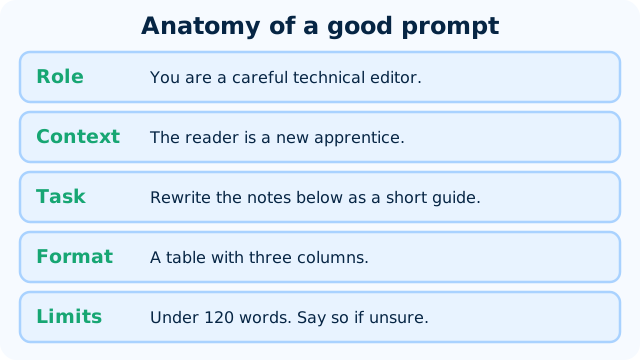
Turn a vague request into a clear prompt with a role, context, task, format and limits, and improve it one change at a time.
Week 4
Advanced prompting
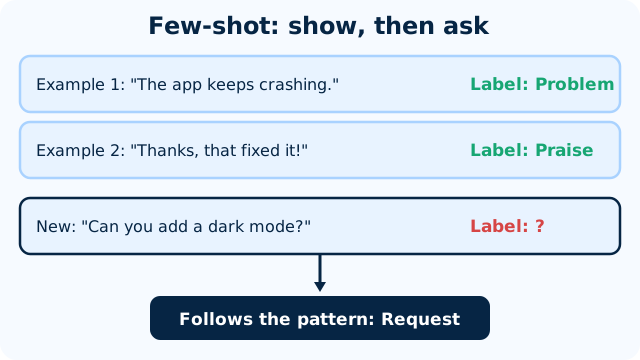
Use examples, structured output, step-by-step reasoning, prompt chains and a self-check to get answers that are easier to trust and reuse.
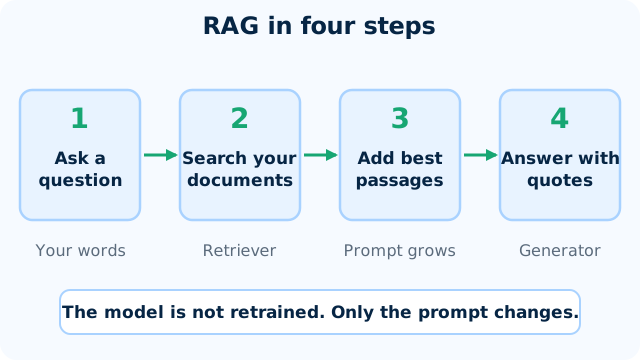
Week 5
Grounding and RAG in plain words
Explain how an assistant answers from your own documents, ask for answers that quote the text, and spot when it should have said it does not know.
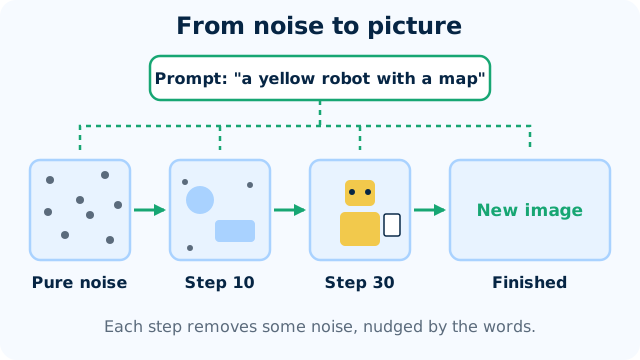
Week 6
Images and multimodal AI
Explain how an image is generated from a text prompt, write a clear image prompt, and check what a vision-capable assistant gets wrong when it reads a picture.
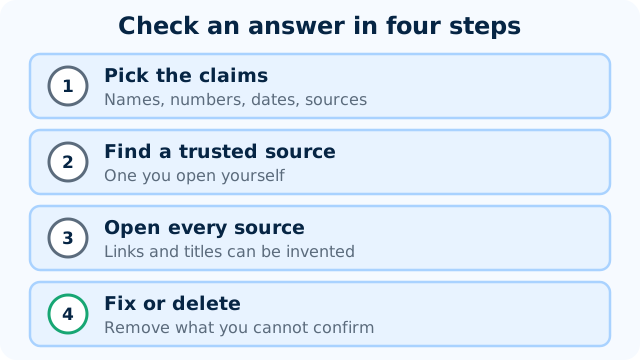
Week 7
Risks: hallucination, bias, privacy, prompt injection
Spot a made-up fact, a biased answer and a privacy leak, explain prompt injection, and check an AI output before you use it.
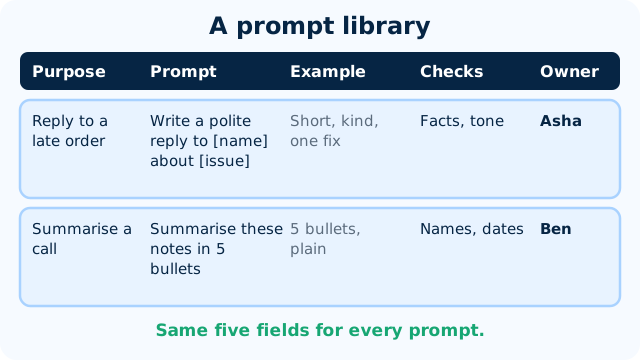
Week 8
A prompt library for a real team (mini project)
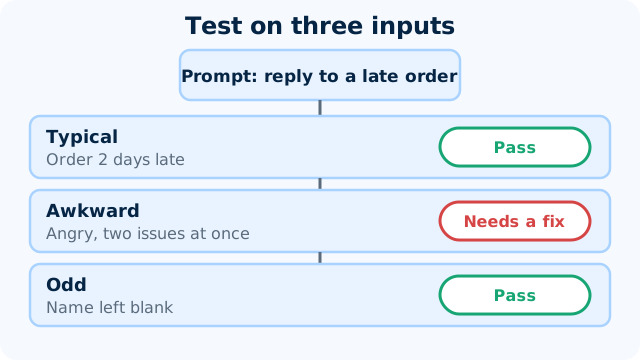
Build, test and share a small library of prompts for one team, with an owner and a review loop that keeps it good.
Practice, if you like
Try a prompt, then improve it.
- Free tools: a free chat assistant (ChatGPT, Gemini, Claude or Copilot free tiers) and Ollama.
- Short exercises you can repeat with your own topics.
- A mini project in week 8: a prompt library for a real team.
- Best on a laptop or tablet. A phone works for reading.
Your pace
Choose a start date and a length.
Any length from 1 to 8 weeks. Start on any date from today. Retry the weekly checks and the final quiz as often as you like.
Certificate and documents
Want proof? Add it later.
Questions
Quick answers
Is the Generative AI and Prompt Engineering Internship really free?
Yes. Joining is free and so are all eight weeks, the weekly checks and the final quiz. You pay only if you choose an optional add-on.
How long can I take?
This internship runs for 1 to 8 weeks. You pick a start date and can change your plan later. All eight weeks are open from day one, so a short plan moves fast and a long one gives you room.
What do I need?
A laptop or phone and a free AI assistant account. Ollama is optional if you want to try a model on your own computer. Every tool used is free or has a free tier, so there is nothing to buy. The notes also read well on a phone.
What will I actually do?
You read short notes with diagrams, watch a few videos and take an easy check each week. Each week ends with a worked exercise, such as rewriting a vague prompt, giving an example, asking for a structured answer or spotting a made-up fact. In week 8 you build a small prompt library a team could use.
What do I get at the end?
A certificate of completion is an optional paid document, issued by Wartens Ltd (UK). It has a QR code and a number, so anyone can verify it at edwartens.com/verification. The lessons stay free, and you can finish without buying anything.
Is this a paid position?
No. It is training, not employment. Nothing is paid to you, and nothing here promises work with any company.
Who wrote the course?
OFORO, the Wartens AI company, wrote the notes and exercises. OFORO builds the AI behind Wartens' engineering and training work. The internship is run by Wartens Ltd (UK) and delivered through EDWartens.
What about privacy and wrong answers?
Generative AI can invent facts, repeat bias and be tricked by hidden instructions, and the course teaches you to check every answer. Never paste personal, client or confidential data into a public chatbot: privacy law applies wherever you live. Keep AI as a drafting aid and let a qualified person decide.
Your first lesson is free.
- No card to start
- Start any date
- Verify with a QR code