Level 2 · Free project
Fault-find the outfeed conveyor starter
The outfeed conveyor has stopped working. Observe the panel, measure live, find the fault, lock out and repair it, then prove it with a FAT. One of eight faults, a different one each task.
Free with a free account. Runs in your browser.
What you will build
Work order WO-PS-201. Your site team, Breakdown: outfeed conveyor CV-201 starter.
Northfield Packing, packing hall. Outfeed conveyor CV-201 is driven by motor M1 (3-phase, 1.5 kW, 415 V, 3.4 A). Its starter panel +C201 is the site's standard starter, the same parts and the same circuit you may know from the pump panel. It has been in service for two years.
The conveyor has stopped working. The operator's report is below. You are the maintenance technician: find the fault, repair it and prove the conveyor works.
What you will learn
- Observe a faulty panel and measure along the circuit
- Lock out and prove dead, live then dead then live
- Repair the fault and prove the machine works again
- Run the acceptance test
How it goes
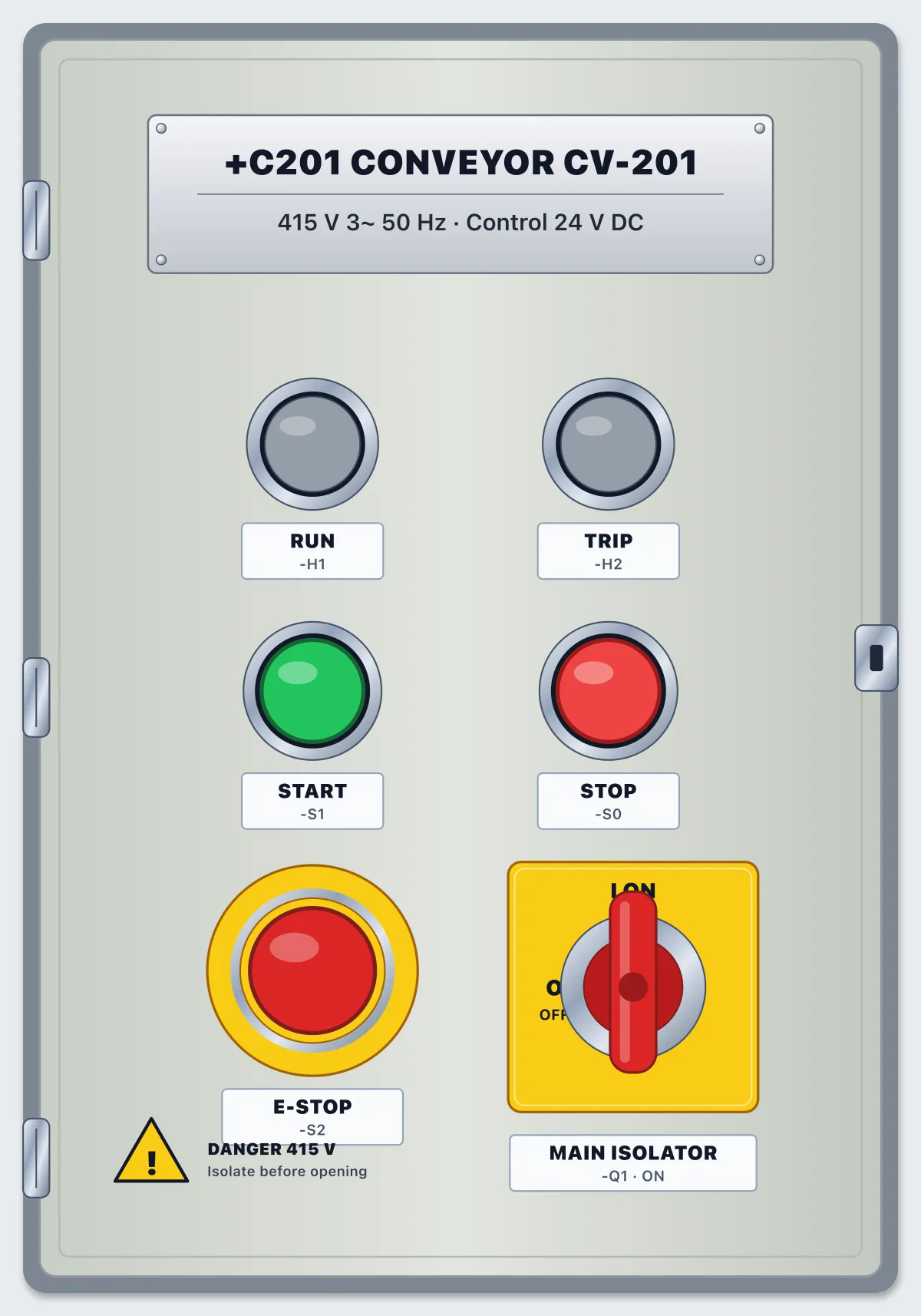
- Observe: operate the door and watch the lamps, the 3D view and the PLC inputs and outputs. What does the panel do, and what does it not do?
- Measure: live voltage tests are allowed, with care. Work along the circuit and find where the voltage stops, or where it should be and is not.
- Isolate: switch off at Q1, lock and tag, and prove it dead, live-dead-live. Resistance readings are only for a dead panel.
- Repair: replace the part or the conductor that has failed. Every spare is charged to the task, so do not change parts by guesswork.
- Restore and prove: tick the checklist, remove your tag and lock, switch Q1 ON, check the PLC is in RUN and test on the door. Then run the FAT.
Parts in the panel
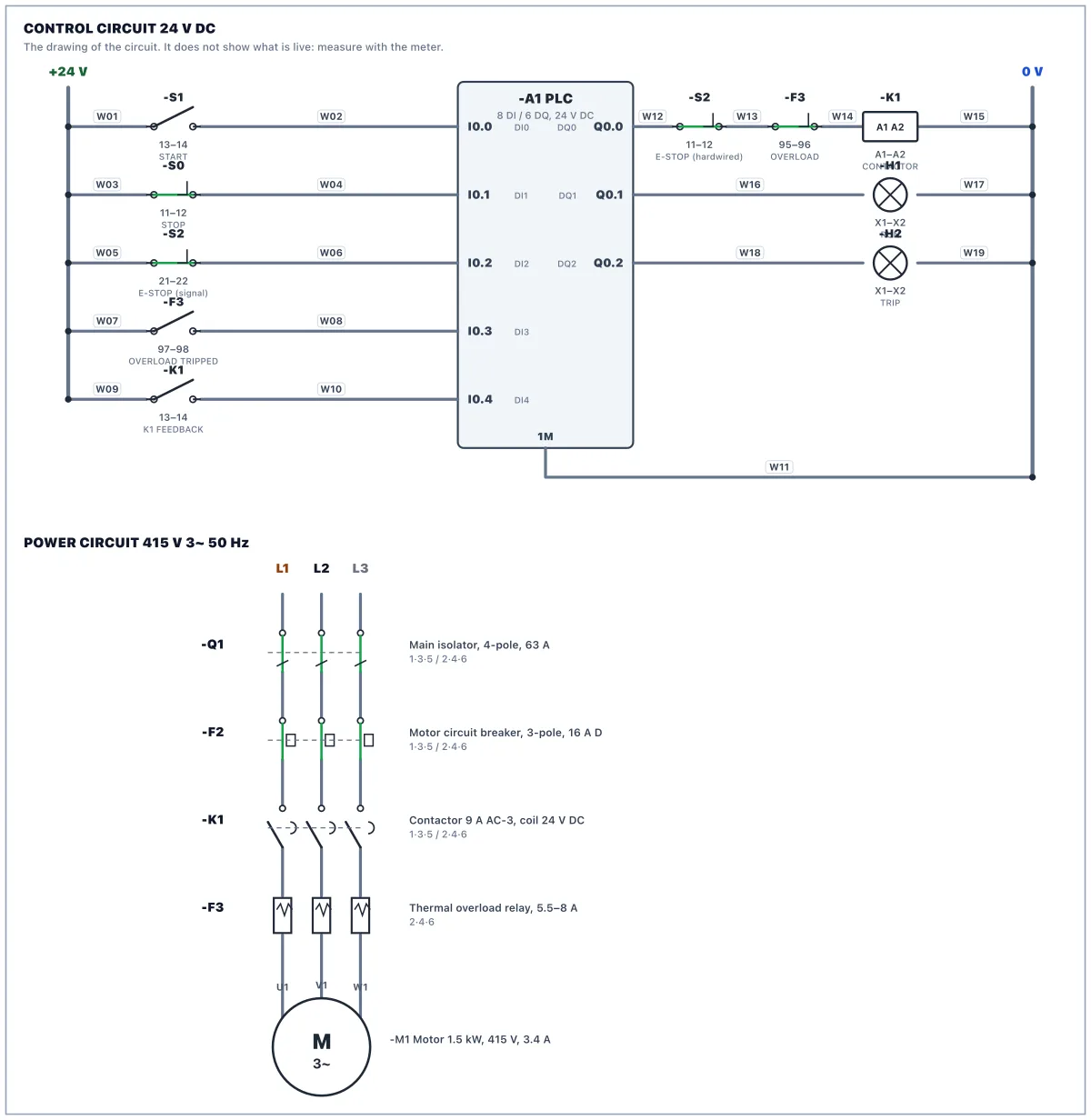
Main isolator, 4-pole, 63 A
Switches all three phases and neutral. The incoming cable lands on 1, 3, 5, 7: those terminals stay live when it is OFF.
MCB 2-pole, 6 A, C curve: control supply
Feeds the 24 V power supply with 230 V (L1 and N).
MCB 3-pole, 16 A, D curve: motor circuit
Protects the motor circuit against short circuits. The overload relay protects the motor against overload.
Contactor 3-pole, 9 A AC-3, coil 24 V DC, 1 NO aux
Switches motor M1. Coil A1(+)/A2(−). The 13 to 14 auxiliary contact tells the PLC the contactor really pulled in.
Thermal overload relay, 5.5 to 8 A
Trips on sustained overcurrent. 95 to 96 (NC) opens and 97 to 98 (NO) closes. Blue button: reset.
Power supply 230 V AC to 24 V DC, 5 A
Its 0 V (−) is bonded to PE at the factory, so 0 V and earth are the same potential.
PLC: compact CPU, 8 DI / 6 DQ, 24 V DC
Inputs I0.0, I0.7 are PNP: 24 V on the terminal turns the input on, with 1M at 0 V. Outputs Q0.0, Q0.5 source 24 V from 3L+.
Terminal strip X2: 24 V DC distribution
Positions 1 to 6 are bridged +24 V, 7 to 12 are bridged 0 V. Top and bottom of each position are the same point.
Terminal strip X1: motor
The motor cable from the plant lands here.
PE bar
Protective earth, bonded to the incoming supply's earth.
Push button START, green, 1 NO
Push button STOP, red, 1 NC
Emergency stop, 2 NC, twist to release
Contact 11 to 12 is hardwired in the coil circuit; 21 to 22 tells the PLC.
Pilot lamp green 24 V: RUNNING
Pilot lamp amber 24 V: OVERLOAD TRIPPED
Motor 3-phase 1.5 kW, 415 V, 3.4 A, driving conveyor CV-201
Questions
- Is it free?
- Yes. The lab is free to use with a free account. There is nothing to buy to open this scenario.
- Do I need to install anything?
- No. It runs in your browser with a 3D panel, a circuit drawing, a meter and a PLC.
- What will I do in Panel Lab 2?
- You find a fault and repair it, then check your work against an acceptance test.
- How long does it take?
- Plan for one sitting. You can stop and come back.
- Do I need experience?
- No. Each work order says what to do step by step, and hints are there if you get stuck.