PLC-08 · Free project
Duty and standby pumps
Share the work between two pumps and take over within seconds when one trips.
Free with a free account. Runs in your browser. About 75 minutes for a first attempt.
What you will build
Work order OT-2608. Oakwood Towers, Booster set BS-1.
Oakwood Towers (building services) needs a controller program for Booster set BS-1. Share the work between two pumps by alternating the duty pump on each demand, hand over to the standby when a pump trips, and flag when both have failed.
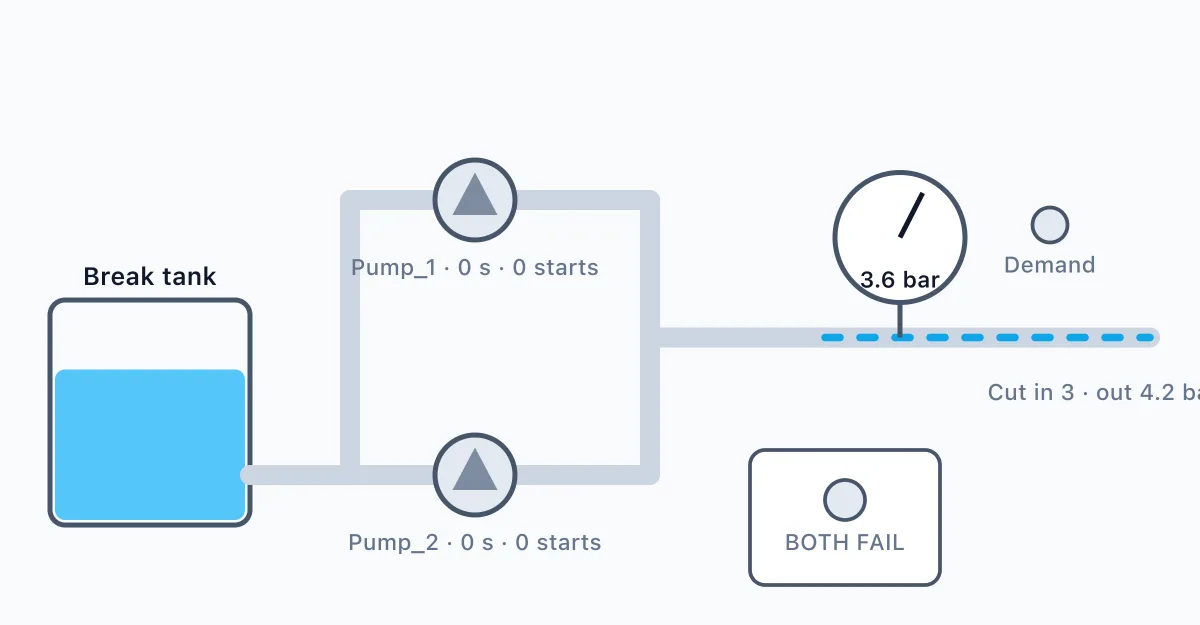
A booster set has two identical pumps, Pump_1 and Pump_2. A pressure switch gives Demand, which reads 1 while water is wanted. Each pump's motor protection gives a trip signal wired normally closed, Trip_1 and Trip_2: 1 is healthy and 0 is tripped. Only one pump runs at a time. When demand comes, the duty pump starts at once and runs until demand ends. The pumps share the work: Pump_1 is duty for the first demand after power on, Pump_2 for the next, and so on, swapping on each new demand and never in the middle of one. A tripped pump must switch off at once and must not be started while its trip is open. If the duty pump trips, or is already tripped when demand comes, the other pump must be running within ms. Whenever there is demand and at least one pump is healthy, a pump must be running within ms. If both pumps are tripped, light Both_Failed, with or without demand; it goes out as soon as either pump is healthy again. What happens when a tripped pump is reset in the middle of a demand is up to you, as long as only one pump runs.
What you will learn
- Duty/standby alternation
- Edge detection
- Fault takeover logic
- Pump protection
- Read a short user requirement specification (URS) and turn it into ladder logic
- Prove your program against a numbered factory acceptance test (FAT)
How it goes
- Read the work order and the URS.
- Build the ladder program against the tag table.
- Run the plant and watch it respond.
- Run the FAT and fix whatever fails.
Tools
Ladder editor in the browser
Draw contacts, coils, timers and counters, then run the program.
A working simulated plant
Watch the machine respond as your logic runs.
A tag table
3 inputs and 3 outputs: Demand, Trip_1, Trip_2, Pump_1, Pump_2, Both_Failed.
URS and FAT documents
The paperwork a real project starts from, with numbered tests.
Questions
- Is it free?
- Yes. The lab is free to use with a free account. There is nothing to buy to open this scenario.
- Do I need to install anything?
- No. It runs in your browser with the ladder editor and a simulated plant.
- What will I do in PLC-08 Duty and standby pumps?
- You build and test a program, then check your work against an acceptance test.
- How long does it take?
- A first attempt takes about 75 minutes.
- Do I need experience?
- No. Each work order says what to do step by step, and hints are there if you get stuck.