PLC-07 · Free project
Parcel sorter
Read the lane at the beam, wait for the parcel to travel, and fire the pusher at the right moment.
Free with a free account. Runs in your browser. About 75 minutes for a first attempt.
What you will build
Work order SL-2607. Swiftline Logistics, Sorter infeed S-1.
Swiftline Logistics (logistics) needs a controller program for Sorter infeed S-1. Catch a lane B parcel at the entry photo-eye and fire a pusher when it arrives further down the belt, forgetting it if the conveyor stops.
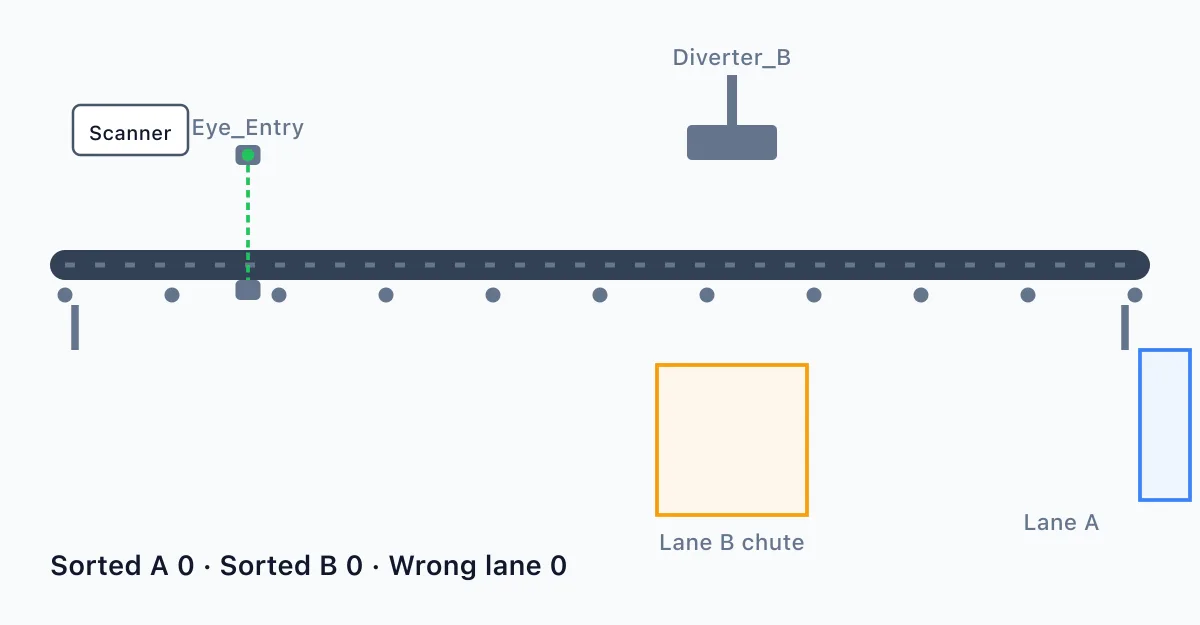
This is the first step towards our parcel sorter. Parcels travel on a Conveyor past an entry photo-eye, Eye_Entry, which reads 1 while a parcel blocks the beam, towards a pusher, Diverter_B, that pushes lane B parcels off the belt. A scanner upstream sets Lane_B to 1 for a lane B parcel and 0 for a lane A parcel. Lane_B is only valid at the moment a parcel breaks the beam: the scanner moves on to the next parcel straight after, so read it then and not later. Start_PB is a momentary push button and Stop_PB is wired normally closed (1 is healthy, 0 is pressed); the conveyor runs from Start until Stop. When a lane B parcel breaks the beam, Diverter_B must switch on ms later, which is the time the parcel takes to reach the pusher, and stay on for ms. Lane A parcels must not fire the pusher. Parcels are spaced so the next one never reaches the eye before the last one has passed the pusher. The pusher must never fire while the conveyor is stopped. If the conveyor is stopped while a parcel is on its way to the pusher, our operators lift that parcel off by hand, so forget it: the pusher must not fire for it after a restart. Anything that breaks the beam while the conveyor is stopped, such as a hand or a loose strap, is not a parcel and must be ignored.
What you will learn
- Edge-triggered sampling
- Timer chains
- Tracking a part along a conveyor
- Clearing state on stop
- Read a short user requirement specification (URS) and turn it into ladder logic
- Prove your program against a numbered factory acceptance test (FAT)
How it goes
- Read the work order and the URS.
- Build the ladder program against the tag table.
- Run the plant and watch it respond.
- Run the FAT and fix whatever fails.
Tools
Ladder editor in the browser
Draw contacts, coils, timers and counters, then run the program.
A working simulated plant
Watch the machine respond as your logic runs.
A tag table
4 inputs and 2 outputs: Start_PB, Stop_PB, Eye_Entry, Lane_B, Conveyor, Diverter_B.
URS and FAT documents
The paperwork a real project starts from, with numbered tests.
Questions
- Is it free?
- Yes. The lab is free to use with a free account. There is nothing to buy to open this scenario.
- Do I need to install anything?
- No. It runs in your browser with the ladder editor and a simulated plant.
- What will I do in PLC-07 Parcel sorter?
- You build and test a program, then check your work against an acceptance test.
- How long does it take?
- A first attempt takes about 75 minutes.
- Do I need experience?
- No. Each work order says what to do step by step, and hints are there if you get stuck.