
Internship certificate verification takes about two minutes when it is done properly: find out who issued the document, use the issuer's own check page by scanning the QR code or typing the number, then compare the name, programme and dates. If any step fails, treat the certificate as unverified until the issuer confirms it in writing.
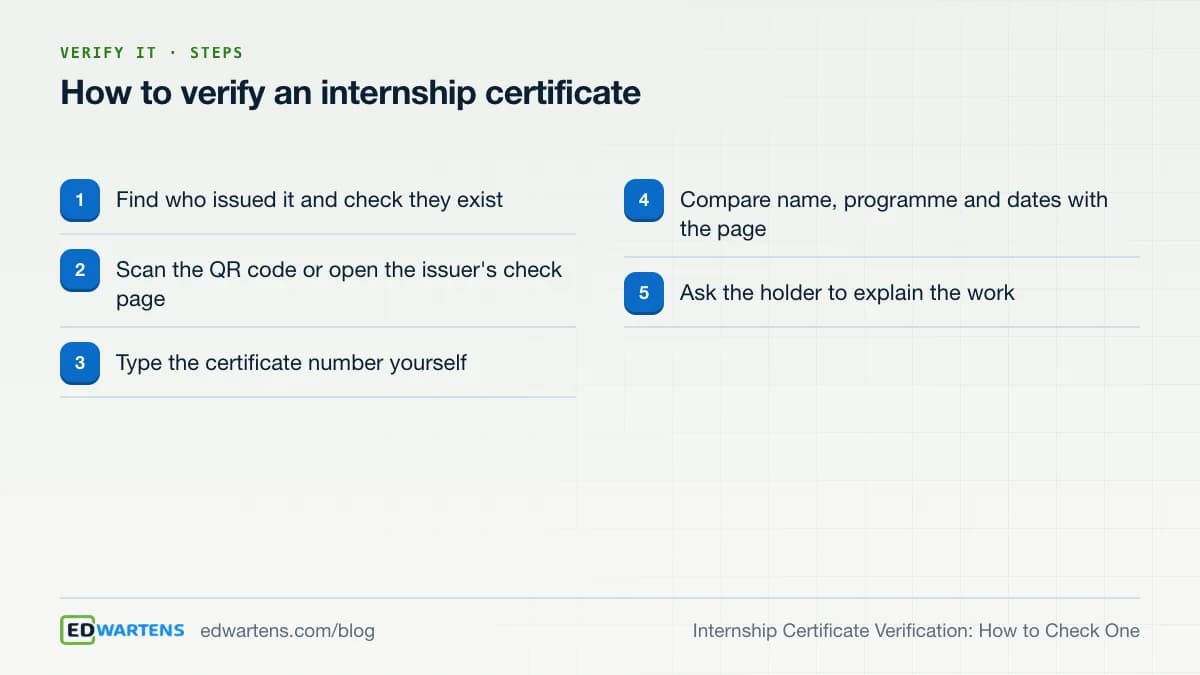
How do you verify an internship certificate?
Follow the five steps above in order. The most important idea is that a certificate is only as good as the issuer's ability to confirm it. A beautiful document that nobody can check is just a picture.
Step 1: find the issuer. A genuine certificate names who issued it. Search for that organisation yourself, not through a link on the document. Check it exists and that its website matches. For a company, look it up on the register in its country.
Step 2: use the issuer's check page. Many issuers print a QR code and a number so you can confirm the document without emailing anyone. Scan the code, or better, type the issuer's verification address into your browser and enter the number by hand. A QR code can point to any website, including a copy of the real one.
Step 3: compare the details. The page should show the same name, programme and dates as the document. Look for status as well: a good system tells you whether a document is valid, replaced by a newer one, or withdrawn. Anything that does not match is a reason to ask questions.
Step 4: ask for the work. A certificate shows that something was issued. It does not show what the person can do. Ask them to explain a project, share a test sheet or walk through a notebook. Five minutes of conversation tells you more than the document.
What do other fields do to verify credentials?
The principles are the same everywhere. In the UK, HEDD, the Higher Education Degree Datacheck, is described as the country's official degree verification hub, run by Prospects Hedd as part of Jisc. Employers, recruitment agencies and universities use it, it needs proof of the individual's consent, and students cannot use it to verify their own awards. It also provides a tool to check whether an institution is a recognised degree-awarding body, and lists bogus institutions (page read 17 October 2026). Note the two ideas: the holder consents, and the issuer's own records are checked.
Digital badges follow the same pattern. The 1EdTech Open Badges standard describes a badge as an image carrying structured metadata that identifies the earner, the issuer and the criteria met, and can include evidence. Each badge is signed by its issuer so its authenticity can be checked (page read 17 October 2026). Even without that technology, the questions are the same: who issued it, to whom, for what, and can the issuer confirm it?
In India, the AICTE National Internship Portal says completing an internship through it earns a government-issued certificate with a QR code that anyone can scan to verify (page read 17 October 2026). That is a useful model for what 'verifiable' should mean.
| Method | What it proves | Limit |
|---|---|---|
| Issuer's number lookup | The issuer issued this document | Says nothing about skill |
| Signed digital badge | The badge is unaltered | Needs a verifier tool |
| Registry check by consent | Records match | Needs the holder's permission |
| Calling the issuer | A person confirms in writing | Slower |
| Reviewing the work | The person can do the task | Needs your time |
What are the red flags of a fake internship certificate?
Look at the document, then the issuer, then the check page.
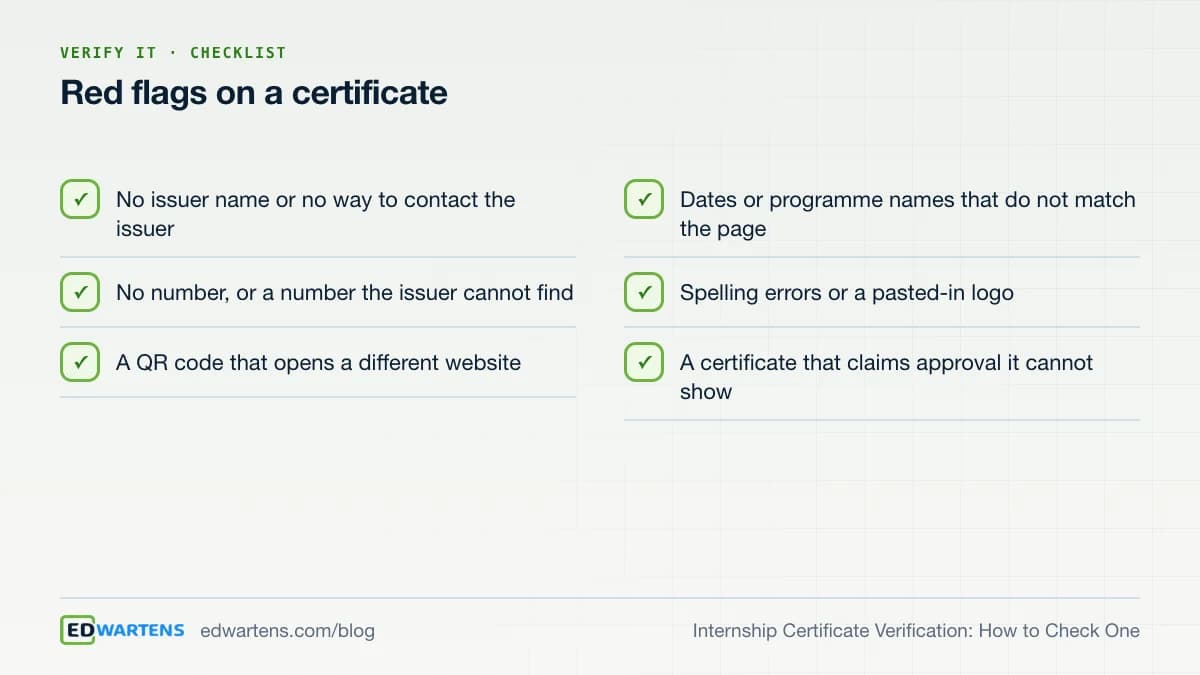
Two flags deserve extra weight. The first is a certificate that claims approval it cannot show: AICTE, UGC or another body's approval is only real if that body issued or published it, and an issuer cannot borrow it. The second is a fee to join. The US Federal Trade Commission warns against paying for certifications or 'training' as a condition of getting work (page read 17 October 2026). Our guide to free internship with certificate: real vs scam covers the pattern in more detail, and how to verify an engineering training certificate covers engineering courses.
How are EDWartens internship certificates verified?
The internship certificate is an optional paid document issued by Wartens Ltd (UK, company number 15262249, Milton Keynes), delivered through EDWartens. The internship itself is free to join, and you choose a certificate only if you want one. It is shown in your currency before you pay.
Every EDWartens internship document carries a QR code and a number. Scan the code, or open edwartens.com/verification and type the number. The page shows the holder's name, the internship and the date, and the document's status: valid, replaced by a newer version or revoked. It never shows the holder's phone number, email or address. You can see exactly what a document looks like, with your own name on it, on the sample documents page. Samples are marked SAMPLE and issued to no one. The wider picture of what the internships are, and what is free, is on the free internships page.
Be clear about what that proves. The certificate says the holder finished the internship, which is training, not employment, and pays no stipend. It does not claim approval from AICTE, UGC or any other body, and whether a university gives credit is the university's decision. Employers can read the colleges page at /internships/colleges to see how documents are meant to be used.
What does the EDWartens check page show?
| Shown on the check page | Not shown |
|---|---|
| The holder's name | Phone number |
| The internship | Email address |
| The dates | Home address |
| The status: valid, replaced or revoked | Payment details |
A good issuer can withdraw a document and says so on the page. If a certificate was issued in error, or replaced by a corrected one, the check page shows that status instead of quietly confirming an old copy. Ask any issuer whether theirs does the same.
What should students do to make verification easy?
Put the verification address and the certificate number on your CV, in the same place as the programme name. Keep a PDF copy and tell the reader which page to open. If your college asks for proof, send the link, not just a scan: a reader who can check it in thirty seconds trusts it more.
What if the issuer is a company in another country?
Check the company itself, not the document. Look it up on the official register in its country and compare the registered name with the name on the certificate. The EDWartens internships are issued by Wartens Ltd, a UK company with company number 15262249 at Milton Keynes, which you can look up on the UK company register yourself. Then check the website address the QR code opens, because a genuine issuer uses its own domain.
Time zones and languages are a minor point. What matters is that the issuer is a real, findable organisation, that it publishes how to check its documents, and that a human can confirm in writing when the automated check cannot.
A two-minute routine for employers and colleges
- Open the issuer's verification page yourself. Do not follow a link from the document.
- Enter the number by hand and compare name, programme and dates.
- Check the status: valid, replaced or revoked.
- Ask the holder for one piece of work and ten minutes of explanation.
- Keep a record of when you checked, and what you saw.
If you are a student, make the check easy for your reader. Put the verification address and the number on your CV and link your project beside them. A reader who can confirm the document in thirty seconds, and then see the work, trusts the whole package more. For ideas on what to put in that package, see engineering portfolio from course projects and internship certificate format.
For practice you can show, try a free course such as the OpenPLC course or machine learning with Python, then pair what you build with a document that anyone can check.
Practise for free
Free PLC Programming Internship
Learn, practise and get documents you can verify; no fee to join.
See the internshipTake the free course
 Free
FreePLC programming · Beginner · Free
OpenPLC: IEC 61131-3 on Arduino, ESP32 and Raspberry Pi
 Free
FreePLC programming · Beginner · Free
CODESYS and IEC 61131-3 Programming
 Free
FreeAI and machine learning · Beginner · Free
Machine Learning with Python
 Free
FreeAI and machine learning · Beginner · Free
Generative AI and LLM Foundations
Questions
How do I verify an internship certificate?
Find the issuer, then use the issuer's own verification page. Scan the QR code or type the certificate number yourself, and compare the name, programme and dates on the page with the document. If the page cannot find it, or opens a site you do not recognise, treat it as unverified.
Can a QR code on a certificate be faked?
Yes, a QR code can point to any website, including a copy of the issuer's page. Check the address it opens, and when in doubt type the issuer's verification address yourself and enter the number by hand instead of trusting the code.
How do I verify an EDWartens internship certificate?
Scan the QR code on the document, or open edwartens.com/verification and type the document number. The page shows the name, the internship and the dates, and whether the document is valid, replaced or revoked. It does not show the holder's phone, email or address.
Does a verified certificate prove someone has a skill?
No. It proves the issuer issued that document to that person for that programme. Skill is shown by the work: a project, a test sheet or a notebook. Ask the holder to walk you through what they built, and treat the certificate as supporting evidence.
What if a certificate cannot be verified online?
Contact the issuer directly through contact details you find yourself, not those printed on the document. Ask them to confirm the holder, programme and dates in writing. If the issuer is a company, check that it is registered in its country.
Can my college accept my internship certificate?
That is the college's decision. Show the certificate, the verification page and your project. Colleges differ on whether they accept self-paced online internships, so ask your training cell for its rules first. No certificate is an approval from AICTE, UGC or any other body unless that body issued it.
Sources
- HEDD, the UK's degree verification hub: who uses it and what it checks (read 17 October 2026)
- 1EdTech, Open Badges standard: issuer, earner, criteria and evidence (read 17 October 2026)
- AICTE National Internship Portal: certificate with a QR code anyone can verify (read 17 October 2026)
- Forage, free job simulations and certificates (read 17 October 2026)
Written by the EDWartens engineering team for general education. Product names are trademarks of their owners; mentioning them does not imply endorsement. Prices and terms of other providers were checked on the date shown and can change.
Summer Internship 2027: A Month-by-Month Plan
AI Internship for Students: A Free Route to Proof
AICTE Internship: Rules, Portal and Online Options
Internship for First Year Students: What Is Realistic
Internship Report Format: Sections and a Checklist
Paid vs Unpaid Internship: Which Is Worth It?