AI and machine learning · Free
Industrial Data with Python
The plumbing nobody teaches: values out of PLCs and meters over Modbus and OPC UA from Python, published over MQTT, stored as time series, cleaned and gridded, forecast and scored for anomalies, and wired to a dashboard — every stage built against a simulator on your own laptop, so no plant is needed and nothing you break matters.

Inside the course


From the lessons

Where plant data lives, and where Python fits
APMonitor.com

Modbus TCP from Python
Fusion Automate
Modbus RTU and serial devices
Fusion Automate

OPC UA from Python
Fusion Automate
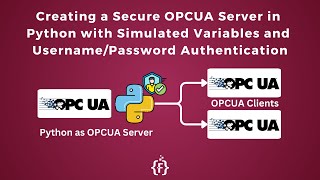
OPC UA security, and a Pi as a server
Fusion Automate
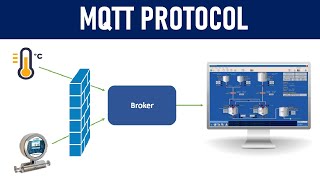
MQTT: publish once, subscribe anywhere
IT and Automation Academy
Lesson frames belong to the creators named in the Credits below and are shown from YouTube.
What you will learn
Read Modbus TCP and RTU devices and OPC UA servers from Python and run simulators of both; subscribe rather than poll; publish on well-designed MQTT topics with quality and timestamps; store in SQLite or InfluxDB with Grafana; clean and grid live process data honestly; forecast day-ahead load and beat the seasonal-naive baseline; detect anomaly episodes on process tags; and assemble the whole pipeline with Node-RED and a model served over HTTP, run as services with security and documentation.
- Read holding registers over Modbus TCP and RTU from Python and decode floats, offsets and scaling correctly
- Run an OPC UA server and client in Python, subscribe to changes and log value, quality and source timestamp
- Design MQTT topics and payloads and bridge OPC UA to a broker with retain and last will
- Store time series in SQLite or InfluxDB, downsample honestly and dashboard with Grafana
- Clean live process data: quality masks, grids, frozen sensors, coverage, joins by time
- Forecast day-ahead load against a seasonal-naive baseline and detect anomaly episodes on process tags
For you
Taking Industrial Data with Python from the United States
- Free in the United States, as everywhere, and self-paced: lessons, notes and the final assessment are open at any hour, so your time zone and shift pattern do not matter.
- The optional certificate for learners in the United States is a one-off US$28.99. What you get for it
- Plants across the Americas most often run Allen-Bradley, Siemens and Inductive Automation; each has its own free course to take next.
- See automation and engineering jobs in the United States, and what the industry looks like in Houston, Detroit and Chicago.
- EDWartens also has a regional site for the United States, for classroom training and local support: edwartens.com/us.
The course project · about 8 hours
A simulated PLC to a dashboard: OPC UA → MQTT → store → clean → anomaly episodes
Run an OPC UA server in Python that simulates a compressor with an injected fault, subscribe to it, publish over MQTT, log to SQLite, clean and grid the data, detect anomaly episodes with a baseline and persistence, publish the episodes back, and show it all on a Node-RED or Grafana dashboard — the whole pipeline on one laptop.
The course project · about 5 hours
Day-ahead compressor-house load forecast that beats seasonal naive
A year of 15-minute kW data. Clean it, build hourly lag and calendar features that respect a 24-hour horizon, train gradient boosting, and compare it honestly with the seasonal-naive baseline on the last three months — MAE in kW, residual plot, and a recommendation for the day-ahead power purchase.
Course content
12 modules · 34 lessons · 10h 21m
In order, at whatever pace suits you. Each module ends with a practice task that builds on the last.
- 01Where plant data lives, and where Python fits2 lessons23m
- 02Modbus TCP from Python4 lessons53m
- 03Modbus RTU and serial devices3 lessons33m
- 04OPC UA from Python7 lessons1h 4m
- 05OPC UA security, and a Pi as a server4 lessons48m
- 06MQTT: publish once, subscribe anywhere3 lessons21m
- 07Storing time series3 lessons1h 50m
- 08Cleaning and resampling process data1 lesson58m
Requirements
- Who it is for
- Intermediate. Needs the Python for AI course; the Machine Learning course helps for the forecasting and anomaly modules. Any PLC or instrumentation background makes the protocols familiar.
- Software
- Python on your own laptop (not only Colab): pymodbus, minimalmodbus, asyncua, paho-mqtt, Mosquitto, SQLite, optionally InfluxDB, Grafana and Node-RED. All free. What to download, and how
- Hardware
- None. A USB–RS485 adapter and any Modbus meter make the serial module real; a Raspberry Pi makes the OPC UA server a device.
Software you need
What to download, where from, what it costs and how to install it. Every link goes to the maker's own site, never a mirror.
Run Python on your own laptop, not only in Colab: the course talks to real ports. minimalmodbus, asyncua and paho-mqtt install with pip the same way as pymodbus. SQLite comes with Python.
Required
- 01Free
Python
Python Software Foundation
- Runs on
- Windows (not Windows 7 or earlier), macOS and Linux. Windows builds for x64, 32-bit and Arm64.
- Account
- None needed
Python is free, open source software. You can use it for learning and for commercial work at no cost.
Steps
- 1.Open python.org/downloads and click the download button for your system.
- 2.On Windows, run the Python install manager (or the classic 64-bit installer) you downloaded.
- 3.If you use the classic installer, tick "Add python.exe to PATH" on the first screen, then click Install Now.
- 4.Open a new Command Prompt or Terminal and run: python --version (on Windows you can also run: py --version).
- 5.Install packages with pip, for example: python -m pip install requests
- pip comes with Python. Run it as python -m pip so it always matches the Python you are using.
- Python.org now recommends the Python install manager on Windows. If it offers to add its folder to PATH, say yes so the python command works everywhere.
- Make a virtual environment for each project: python -m venv .venv
Official download pagepython.orgAlternatives
- Anaconda Distribution: Python with 600+ data science packages and Jupyter already included.
- 02Free
PyModbus
pymodbus-dev (open source project), a Python or npm package
- Runs on
- Windows, macOS and Linux with Python 3.10 or later
- Account
- None needed
Free, open source under the BSD 3-Clause licence.
Steps
- 1.Install Python 3.10 or later and create a virtual environment.
- 2.Run: pip install "pymodbus==3.8.6" (the version the course code is written and tested for; 3.10 renamed slave= to device_id=)
- 3.For serial (RS-485) devices, run: pip install "pymodbus[serial]==3.8.6"
- 4.Follow the client examples in the documentation to read holding registers from a device or the built-in simulator.
- PyModbus includes a server simulator with a web interface, so you can practise without real hardware.
- Only write registers on lab equipment. Writes can move real machines.
Official download pagegithub.com - 03Free
Eclipse Mosquitto
Eclipse Foundation
- Runs on
- Windows (64-bit and 32-bit installers), macOS (Homebrew), Linux (Ubuntu PPA, Debian, Raspberry Pi, Snap)
- Account
- None needed
Free, open source under the Eclipse Public License and Eclipse Distribution License.
Steps
- 1.Open mosquitto.org/download.
- 2.On Windows, download the 64-bit installer and run it. On macOS run: brew install mosquitto. On Ubuntu run: sudo apt-add-repository ppa:mosquitto-dev/mosquitto-ppa, then sudo apt-get update and sudo apt-get install mosquitto mosquitto-clients.
- 3.Start the broker by running: mosquitto -v
- 4.In a second terminal, subscribe with: mosquitto_sub -t test, and in a third publish with: mosquitto_pub -t test -m hello
- By default Mosquitto 2 only accepts connections from the same computer. To allow other devices, add a listener and authentication settings to mosquitto.conf.
- Use a lab network only. Do not expose an open broker to the internet.
Official download pagemosquitto.org
Optional
Useful, not needed to finish the course.
- 04Free
InfluxDB (open source)
InfluxData
- Runs on
- InfluxDB 3 Core: Linux, macOS, Docker. InfluxDB OSS 2.x: Windows, macOS, Linux, Docker, Raspberry Pi (64-bit).
- Account
- None needed
The open source editions are free. InfluxDB 3 Core is under the MIT and Apache 2 licences and is what InfluxData recommends for new users. InfluxDB OSS 2.x is still offered and includes a web UI.
Steps
- 1.Open influxdata.com/downloads and choose InfluxDB 3 Core or InfluxDB OSS 2.x (use the one your course names).
- 2.Pick your platform and follow the install commands shown (Docker is simplest).
- 3.For OSS 2.x, start the server with: influxd
- 4.Open http://localhost:8086 and set up your first user, organisation and bucket, then save the API token it shows.
- The API token is shown once. Store it safely.
- Grafana can read from InfluxDB for dashboards.
Official download pageinfluxdata.com - 05Free
Grafana
Grafana Labs
- Runs on
- Windows, macOS, Linux (Debian/Ubuntu, RHEL/Fedora, SUSE, ARM64) and Docker
- Account
- None needed
Grafana OSS is free and open source under AGPLv3. The Grafana Enterprise download is also free to use without a licence key and is functionally identical until you buy an Enterprise licence.
Steps
- 1.Open grafana.com/grafana/download and choose the edition (Enterprise is recommended by Grafana and is free to use; OSS is fine too).
- 2.Pick your platform and download the installer or package.
- 3.Install and start the Grafana service.
- 4.Open http://localhost:3000 and sign in with the default admin account (admin / admin), then set a new password.
- 5.Add a data source, such as InfluxDB, and build your first dashboard.
- Change the default admin password straight away.
Official download pagegrafana.com - 06Free
Node-RED
OpenJS Foundation (Node-RED project)
- Runs on
- Windows, macOS and Linux (needs Node.js 22 or later; Node.js 24 recommended), or Docker
- Account
- None needed
Free, open source under the Apache 2.0 licence.
Steps
- 1.Install Node.js LTS from nodejs.org.
- 2.On Windows run: npm install -g node-red (on macOS or Linux run: sudo npm install -g node-red).
- 3.Start it by running: node-red
- 4.Open http://localhost:1880 in your browser to use the editor.
- With Docker, run: docker run -it -p 1880:1880 --name mynodered nodered/node-red
- Leave the terminal window open while you use Node-RED.
Official download pagenodered.org - 07Free
Visual Studio Code
Microsoft
- Runs on
- Windows 64-bit (supported Windows client versions), macOS (latest and two previous releases), Linux (Ubuntu 20.04, Debian 10, RHEL 8, Fedora 36 or later)
- Account
- None needed
- Size
- Less than 200 MB download, under 500 MB installed
Free to download and use. Extensions from the Marketplace each have their own licence.
Steps
- 1.Open code.visualstudio.com/download.
- 2.Pick the installer for your system (on Windows, the User Installer is fine).
- 3.Run the installer. On Windows, tick "Add to PATH" if it is offered.
- 4.Open VS Code and install the extensions your course uses, for example the Python extension.
- Hardware needs are small: a 1.6 GHz processor and 1 GB of RAM.
- On Windows, the "Open with Code" options in the installer let you open folders from File Explorer.
Official download pagecode.visualstudio.com
Checked against each maker's own page on 27 September 2026. Trial lengths and editions change; the maker's page is the final word.
Industrial Data with Python at a glance
Industrial Data with Python is a free, self-paced online course from EDWartens for engineers, developers and students applying AI to real work. It has 12 modules and 10h 21m of video lessons by Fusion Automate, Rocket Systems, APMonitor.com and others, with written notes and worked problems, a practical project with a document pack and a 15-question final assessment (pass mark 60%). Learning is free with an account; an optional certificate with a public verification code is issued when you pass. Last updated 27 September 2026.
All course factsHide course facts
- Price
- Free, for good. No trial, no card. The only paid item is the optional certificate, a small one-off fee.
- Who it is for
- Engineers, developers and students applying AI to real work
- Format
- 12 self-paced modules, 10h 21m of video, written notes, a practice task per module and one final assessment.
- Level
- Intermediate. Intermediate. Needs the Python for AI course; the Machine Learning course helps for the forecasting and anomaly modules. Any PLC or instrumentation background makes the protocols familiar.
- Brand
- Vendor-neutral
- Software
- Python on your own laptop (not only Colab): pymodbus, minimalmodbus, asyncua, paho-mqtt, Mosquitto, SQLite, optionally InfluxDB, Grafana and Node-RED. All free.
- Hardware
- None. A USB–RS485 adapter and any Modbus meter make the serial module real; a Raspberry Pi makes the OPC UA server a device.
- Certificate
- Optional EDWartens Certificate of Completion, verifiable by code. Not a vendor credential.
- Video lessons by
- Fusion Automate, Rocket Systems, APMonitor.com, RealPars, Chipsee, Johannes 4GNU_Linux, InfluxData, Masters Of The Code, IT and Automation Academy, Dave Ebbelaar, Rob Mulla, freeCodeCamp.org, Lianne and Justin, AIEngineering, NeuralNine (independent creators, credited below)
- Language
- English
- Last updated
- 27 September 2026
A shareable EDWartens certificate
Finish every module and pass the final assessment, and the optional EDWartens certificate is yours. It carries a unique verification code on a public page anyone can check, so it stands up when a recruiter looks it up. See it below.
The course itself stays free whether or not you ever buy one.
Stuck? Ask a practising engineer
A free course usually means a comment section and hope. This one does not. Every module has an Ask-your-trainer panel that reaches the same engineers who teach our paid programme: people who commission panels for a living, not moderators.
Pairs well with
 PLC programming · FreeSiemens TIA PortalFrom zero electrical knowledge to a working, simulated S7-1200 program, for nothing.
 PLC programming · FreeSiemens TIA Portal in Three HoursThe first three hours of the Siemens TIA Portal course, cut to end on a win: what a PLC is, how it is wired, a project configured in TIA Portal, and your first ladder program running in simulation. Finish it in an evening or two, earn a certificate, and carry straight on into the full course.
 PLC programming · FreeTIA Portal: Build a MachineOne machine, start to finish. Take a bottle filling line from a written specification and an I/O list to a structured S7-1200 program with a fill station, a capper, a reject sorter and an operator screen with alarms, then test it against a written record and archive it for hand-over. The lessons are the reference; the machine is yours, and it is what you submit.
 Instrumentation · FreeInstrumentation for PLC EngineersThe half of the loop that is not code. Follow one measurement from the transmitter in the field, down the 4-20 mA loop, into the analog card, through NORM_X and SCALE_X into engineering units, out again to a valve, and back to the control room when the reading is wrong.
More free courses: Free Industry 4.0 and IIoT courses · Free AI courses for engineers
Learning paths with this course
- Industrial AI engineer · 4 coursesAI where the machines are: where it sits beside PLC and SCADA, predictive maintenance on real run-to-failure data, machine vision quality inspection with YOLO, and plant data over Modbus and OPC UA in Python.
Learner reviews
No reviews yet
Reviews here are written only by learners who have finished every module of Industrial Data with Python, and they are published exactly as written. Finish the course and yours will be the first.
Common questions
Do I need a PLC or a meter?
No. Every module runs against a simulator you write in Python — a Modbus slave, an OPC UA server, a local MQTT broker. A USB–RS485 adapter and any meter make the serial module real if you have them.
Why not just use Node-RED?
Node-RED is excellent glue and has its own free course here. This course is for the parts Node-RED does not do well — decoding, cleaning, storing at scale, forecasting, anomaly detection — and for understanding what the glue is gluing. The last module wires the two together.
What are the projects in the Industrial Data with Python course?
A complete bench pipeline: an OPC UA simulator with an injected fault, a subscribing client publishing to MQTT, a logger to SQLite, cleaning and gridding, an anomaly detector with a baseline and persistence, episodes published back and a dashboard — with the detection lag measured against the injection time. And a day-ahead load forecast on a year of compressor data that must beat the seasonal-naive baseline, with the improvement converted to money saved.
Is the Industrial Data with Python course really free?
Yes. Every module, practice task, project and assessment. You create an account so your progress is saved and the assessments can be marked. The certificate is the only paid item, and only if you want it.
What certificate does the Industrial Data with Python course give?
An EDWartens Certificate of Completion, issued when you have finished the modules and passed the final assessment (the project is optional practice), with a verification code anyone can check. It is not a vendor credential and is never described as one.
Who made the video lessons in the Industrial Data with Python course?
The creators named in the Credits block at the foot of this page, on their own YouTube channels. EDWartens did not make the videos and the creators are not affiliated with EDWartens. What EDWartens wrote is the study plan, the notes, the practice tasks, the projects and the assessments.
How long does the Industrial Data with Python course take?
Plan on about 16 hours in all, including the video lessons, notes and practice tasks. It is self-paced, so you work through the twelve modules at your own speed.
What you walk away with
Your certificate for Industrial Data with Python
Finish the course, pass the final, and this is the document with your name on it.

Verifiable by anyone
Adds to LinkedIn in one click
QR code on the certificate
Names what you can do
A permanent link
Earned, not attended
Learning is free. The certificate is optional.
Add it now and pay only when you have finished the course, or come back for it later. One-off, US$28.99, with a receipt.
Issued by EDWartens, the training division of Wartens, as a Certificate of Completion for this self-paced course. Sold by Wartens Ltd (England and Wales). It is not a vendor certification, a university award or a CPD-accredited activity, and it does not certify competence on live equipment. Delivered electronically; see the refund policy.
Credits
Who made the video lessons
The video lessons in this course were created by the people below, not by EDWartens. Every lesson streams from its creator's own YouTube channel; EDWartens neither hosts nor sells that footage, and the creators are not affiliated with EDWartens and do not endorse this course. What EDWartens wrote is the study plan, the notes, the practice tasks and the assessments.
- Fusion Automatethe OPC UA and Python series, the Modbus TCP and RTU tutorials and the OPC UA to MQTT converters
- Rocket Systemsthe OPC UA series with Raspberry Pi, security and a dashboard
- APMonitor.comdata transfer with Modbus, OPC and SQL
- RealParsthe OPC UA and Node-RED explainers
- Chipseereading Modbus data with Python
- Johannes 4GNU_Linuxa Modbus TCP server with pyModbusTCP
- InfluxDatatime-series basics and querying InfluxDB with Grafana
- Masters Of The CodeInfluxDB 2, Grafana and Python monitoring
- IT and Automation Academythe MQTT explainer
- Dave Ebbelaardetecting outliers in sensor data
- Rob Mullatime-series forecasting with XGBoost
- freeCodeCamp.orgtime-series forecasting in Python
- Lianne and JustinARIMA models in Python
- AIEngineeringanomaly detection with Isolation Forest on time series
- NeuralNineanomaly detection for time-series data
If you are one of these creators and would like a lesson removed or credited differently, write to info@wartens.com.