Data and analytics · Free
Power BI for Manufacturing: OEE and Production Dashboards
The no-code way out of the weekly Excel production report. Twelve modules take an engineer from opening Power BI Desktop for the first time to a shift-wise OEE dashboard: Power Query on downtime and production exports, a star schema a plant model can live in, the DAX behind availability, performance and quality, a downtime Pareto that ranks by lost minutes, reject rate by machine and shift, plan against actual, and the refresh, publishing and handover that keep it running after you.

Inside the course
From the lessons
What Power BI does on an engineer's desk
Chandoo
The same workflow, taught a second way
Learn Skills Daily

DAX: writing the measures
Chandoo

Report layout, tooltips and interaction
Chandoo

Downtime Pareto and reject analysis
Havens Consulting

Plan against actual: targets and variance
Chandoo
Lesson frames belong to the creators named in the Credits below and are shown from YouTube.
What you will learn
Load plant data from Excel, CSV and SQL with Power Query and write cleaning steps that rerun on next month's file; split a flat production sheet into a fact table and its dimensions and set the relationships correctly; write measures with SUM, DISTINCTCOUNT, DIVIDE and CALCULATE; calculate availability, performance, quality and OEE in DAX and defend the definitions you used; build a downtime Pareto, a reject-rate view and a machine-utilisation page; lay the report out so a plant head can read it on a phone; and set up refresh, publishing and a handover note so the dashboard survives your transfer.
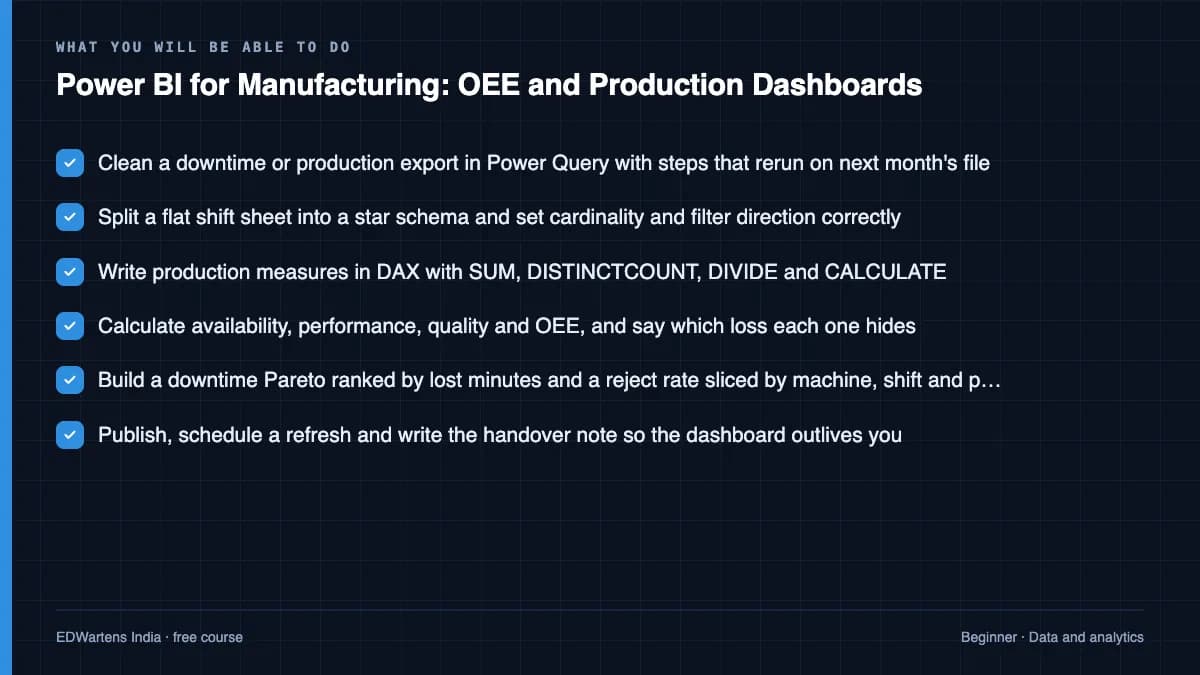
- Clean a downtime or production export in Power Query with steps that rerun on next month's file
- Split a flat shift sheet into a star schema and set cardinality and filter direction correctly
- Write production measures in DAX with SUM, DISTINCTCOUNT, DIVIDE and CALCULATE
- Calculate availability, performance, quality and OEE, and say which loss each one hides
- Build a downtime Pareto ranked by lost minutes and a reject rate sliced by machine, shift and part
- Publish, schedule a refresh and write the handover note so the dashboard outlives you
For you
Taking Power BI for Manufacturing: OEE and Production Dashboards from the United States
- Free in the United States, as everywhere, and self-paced: lessons, notes and the final assessment are open at any hour, so your time zone and shift pattern do not matter.
- The optional certificate for learners in the United States is a one-off US$23.99. What you get for it
- Plants across the Americas most often run Allen-Bradley, Siemens and Inductive Automation; each has its own free course to take next.
- See automation and engineering jobs in the United States, and what the industry looks like in Houston, Detroit and Chicago.
- EDWartens also has a regional site for the United States, for classroom training and local support: edwartens.com/us.
The course project · about 16 hours
One OEE definition for three plants: a Power BI dashboard from shift logs to row-level security
Build the OEE and production dashboard for a three-plant auto-parts company: Power Query on each plant's shift and downtime exports, a star schema, the DAX chain for availability, performance, quality and OEE, a downtime Pareto by lost minutes, plan against actual, and the publish, refresh and row-level security that let each plant see only itself. You deliver the .pbix, your own measure register and validation report, and the refresh procedure. The sample pack shows what each one looks like when a consultant delivers it to a plant.
Sample document pack, 7 documents, filled in for the scenario
- URSUser Requirements: Group OEE and Production Dashboard
- SDSSoftware Design Specification: OEE Dataset and Report
- RegisterMeasure Register: DAX Definitions and Validation References
- HMI specPage Specification: Hierarchy, Visuals, Filters and Roles
- Test reportValidation Report: Load, Model, Measures Against Source, Pages, Security and Refresh
- ProcedureProcedure: Publishing, Refresh, Row-Level Security and Maintenance
- Training recordTraining Record: OEE Dashboard, Viewers, Plant Engineers and Analyst
Read inside the course and download as a workbook. The project is optional practice, marked when you submit it; the certificate needs only the modules and the final assessment.
Course content
13 modules · 21 lessons · 8h 50m
In order, at whatever pace suits you. Each module ends with a practice task that builds on the last.
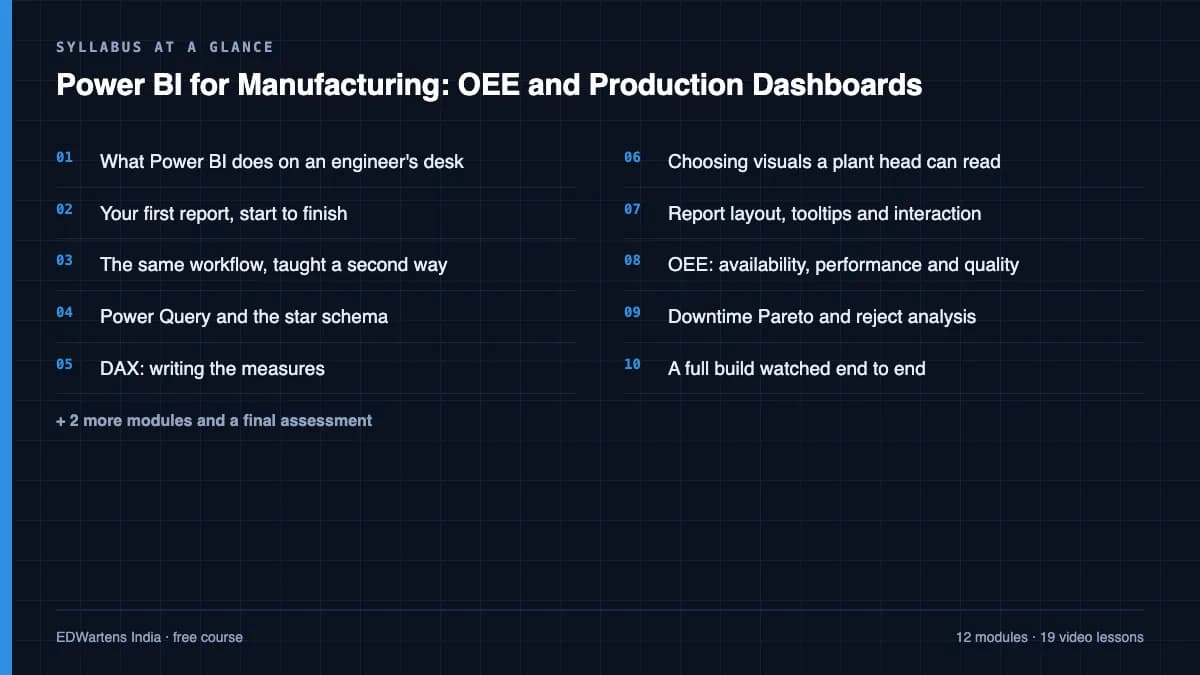
- 01What Power BI does on an engineer's desk2 lessons24m
- 02Your first report, start to finish1 lesson38m
- 03The same workflow, taught a second way1 lesson36m
- 04Power Query and the star schema3 lessons50m
- 05DAX: writing the measures1 lesson54m
- 06Choosing visuals a plant head can read2 lessons38m
- 07Report layout, tooltips and interaction2 lessons32m
- 08OEE: availability, performance and quality3 lessons57m
Requirements
- Who it is for
- Beginner. Comfort with Excel helps, no coding needed. Power BI Desktop is free but runs on Windows only.
- Software
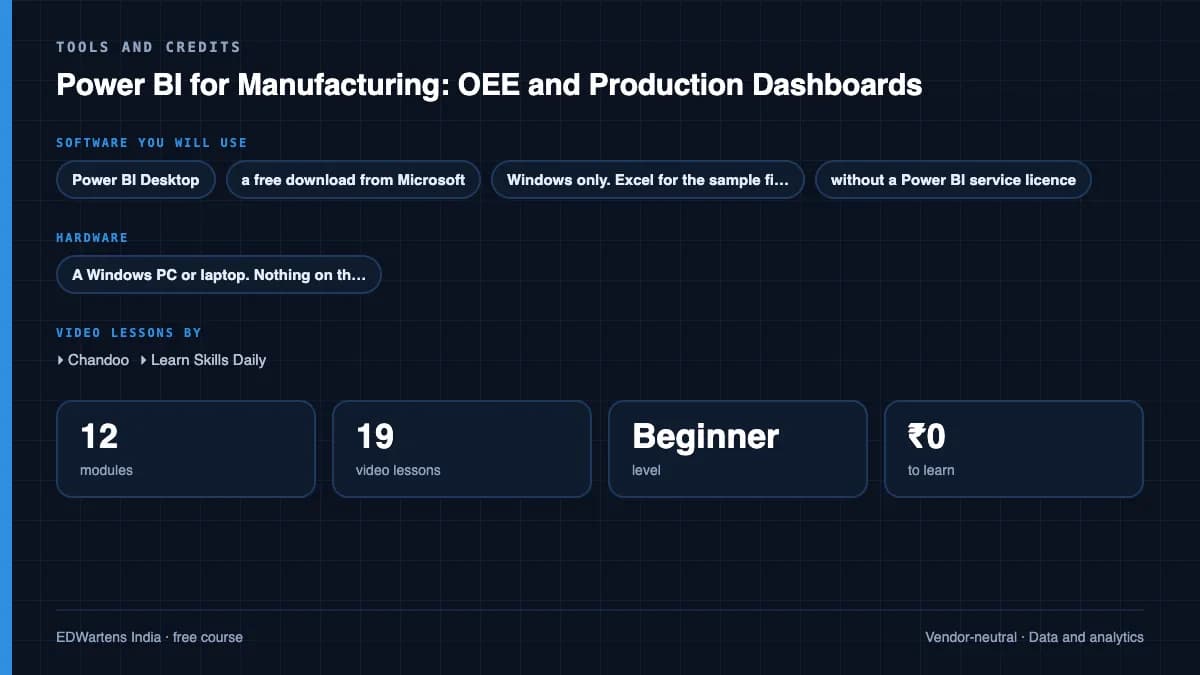
- Power BI Desktop, a free download from Microsoft, Windows only. Excel for the sample files. Every module can be completed on Desktop alone, without a Power BI service licence. What to download, and how
- Hardware
- A Windows PC or laptop. Nothing on the plant side.
Software you need
What to download, where from, what it costs and how to install it. Every link goes to the maker's own site, never a mirror.
Every module can be completed in Power BI Desktop alone, without a Power BI service licence.
Required
- 01Free
Power BI Desktop
Microsoft
- Runs on
- Windows 10, Windows 11 or Windows Server 2016 and later, 64-bit
- Account
- None needed
- Size
- about 662 MB download for the installer from the Download Center
Power BI Desktop is a free download for building data models and reports on your own PC. Sharing reports through the Power BI service needs a Power BI licence.
Steps
- 1.Open the Power BI Desktop page and select Download free.
- 2.Install it from the Microsoft Store, or download the installer from the Microsoft Download Center.
- 3.Start Power BI Desktop and close the sign-in prompt if you only work locally.
- 4.Select Get data to load the course's Excel or CSV file.
- 5.Save your report as a .pbix file.
- The Microsoft Store version updates itself and does not need administrator rights.
- On a Mac, run Windows in a virtual machine; there is no macOS version.
- At least 4 GB of RAM and a 1440x900 or larger screen are recommended.
Official download pagemicrosoft.com
Optional
Useful, not needed to finish the course.
- 02Free web version with limits
Microsoft Excel
Microsoft
- Runs on
- Excel for the web in any modern browser; desktop apps for Windows and macOS with a Microsoft 365 subscription
- Account
- A free Microsoft account
Excel for the web is free with a Microsoft account and 5 GB of cloud storage. The desktop app comes with a paid Microsoft 365 subscription, which offers a free trial. Python in Excel is not available on free licences, and fuller Copilot features need an eligible paid plan.
Steps
- 1.Open the Excel page on microsoft.com and select Sign up for free, or Sign in.
- 2.Create or sign in to your Microsoft account.
- 3.Select Open Excel to start Excel for the web.
- 4.Upload the course workbook to OneDrive and open it.
- 5.If a lesson needs a desktop-only feature, consider the Microsoft 365 free trial.
- Most formulas, tables and charts work in Excel for the web; some advanced tools, such as Power Pivot and many add-ins, need the desktop app.
- Check the Python in Excel availability page before a Python lesson.
Official download pagemicrosoft.comAlternatives
- LibreOffice Calc: Free desktop spreadsheet for Windows, macOS and Linux.
- Google Sheets: Free browser spreadsheet with a Google Account.
Checked against each maker's own page on 27 September 2026. Trial lengths and editions change; the maker's page is the final word.
Power BI for Manufacturing: OEE and Production Dashboards at a glance
Power BI for Manufacturing: OEE and Production Dashboards is a free, self-paced online course from EDWartens for automation engineers working with plant data. It has 13 modules and 8h 50m of video lessons by Chandoo, Learn Skills Daily, CQE Academy and others, with written notes and worked problems, a practical project with a document pack and a 15-question final assessment (pass mark 60%). Learning is free with an account; an optional certificate with a public verification code is issued when you pass. Last updated 27 September 2026.
All course factsHide course facts
- Price
- Free, for good. No trial, no card. The only paid item is the optional certificate, a small one-off fee.
- Who it is for
- Automation engineers working with plant data
- Format
- 13 self-paced modules, 8h 50m of video, written notes, a practice task per module and one final assessment.
- Level
- Beginner. Beginner. Comfort with Excel helps, no coding needed. Power BI Desktop is free but runs on Windows only.
- Brand
- Vendor-neutral
- Software
- Power BI Desktop, a free download from Microsoft, Windows only. Excel for the sample files. Every module can be completed on Desktop alone, without a Power BI service licence.
- Hardware
- A Windows PC or laptop. Nothing on the plant side.
- Certificate
- Optional EDWartens Certificate of Completion, verifiable by code. Not a vendor credential.
- Video lessons by
- Chandoo, Learn Skills Daily, CQE Academy, PK: An Excel Expert, Havens Consulting (independent creators, credited below)
- Language
- English
- Last updated
- 27 September 2026
A shareable EDWartens certificate
Finish every module and pass the final assessment, and the optional EDWartens certificate is yours. It carries a unique verification code on a public page anyone can check, so it stands up when a recruiter looks it up. See it below.
The course itself stays free whether or not you ever buy one.
Stuck? Ask a practising engineer
A free course usually means a comment section and hope. This one does not. Every module has an Ask-your-trainer panel that reaches the same engineers who teach our paid programme: people who commission panels for a living, not moderators.
Pairs well with
 PLC programming · FreeSiemens TIA PortalFrom zero electrical knowledge to a working, simulated S7-1200 program, for nothing.
 PLC programming · FreeSiemens TIA Portal in Three HoursThe first three hours of the Siemens TIA Portal course, cut to end on a win: what a PLC is, how it is wired, a project configured in TIA Portal, and your first ladder program running in simulation. Finish it in an evening or two, earn a certificate, and carry straight on into the full course.
 PLC programming · FreeTIA Portal: Build a MachineOne machine, start to finish. Take a bottle filling line from a written specification and an I/O list to a structured S7-1200 program with a fill station, a capper, a reject sorter and an operator screen with alarms, then test it against a written record and archive it for hand-over. The lessons are the reference; the machine is yours, and it is what you submit.
 Instrumentation · FreeInstrumentation for PLC EngineersThe half of the loop that is not code. Follow one measurement from the transmitter in the field, down the 4-20 mA loop, into the analog card, through NORM_X and SCALE_X into engineering units, out again to a valve, and back to the control room when the reading is wrong.
More free courses: Free Industry 4.0 and IIoT courses · Free Six Sigma and quality courses
Learner reviews
No reviews yet
Reviews here are written only by learners who have finished every module of Power BI for Manufacturing: OEE and Production Dashboards, and they are published exactly as written. Finish the course and yours will be the first.
Common questions
Is the Power BI for Manufacturing course really free?
Yes. All twelve modules, the practice tasks, the notes and the assessments are free. You create an account so your progress is saved and the final assessment can be marked. The certificate is the only paid item, and only if you want one.
What certificate does the Power BI for Manufacturing course give?
An EDWartens Certificate of Completion, issued when you have finished every module and passed the final at 60 percent, with a verification code anyone can check. It is not a Microsoft credential and is never described as one.
Who made the video lessons in the Power BI for Manufacturing course?
Chandoo and Learn Skills Daily, on their own YouTube channels, credited at the foot of the course page. EDWartens did not make the videos and neither creator is affiliated with EDWartens. What EDWartens wrote is the study plan, the notes, the OEE material, the practice tasks and the assessments.
Do I need to buy Power BI?
No. Power BI Desktop is a free download from Microsoft and every module can be completed on it. Note that Desktop runs on Windows only, so a Mac needs Windows in a virtual machine. Publishing and sharing through the Power BI service needs a licence, which your employer usually already holds inside its Microsoft 365 tenant.
Is this the same as the Microsoft PL-300 certification?
No. PL-300 is Microsoft's paid exam and this course is neither that exam nor a substitute for it. It is preparation and practice: it covers Power Query, modelling, DAX and report design on manufacturing data, which is the same ground, but the certificate you receive is an EDWartens Certificate of Completion.
Do I need to know Python or SQL first?
No. This is the no-code route. If you can build a pivot table in Excel you have enough. The SQL and Python courses in the track sit beside this one, not before it.
What if my plant has no OEE data yet?
That is the normal starting point. The practice tasks are written for one machine and one shift on paper, so you can work through the whole course with a downtime register and a production log. The course also covers what to do when the reason codes are free text, which is the usual problem.
Who is the Power BI for Manufacturing course for?
Automation, maintenance, quality and production engineers who currently report in Excel, and anyone who has been asked to put the daily production numbers on a screen. The engineer who builds the OEE dashboard tends to become the one who presents it in the morning meeting.
What you walk away with
Your certificate for Power BI for Manufacturing: OEE and Production Dashboards
Finish the course, pass the final, and this is the document with your name on it.
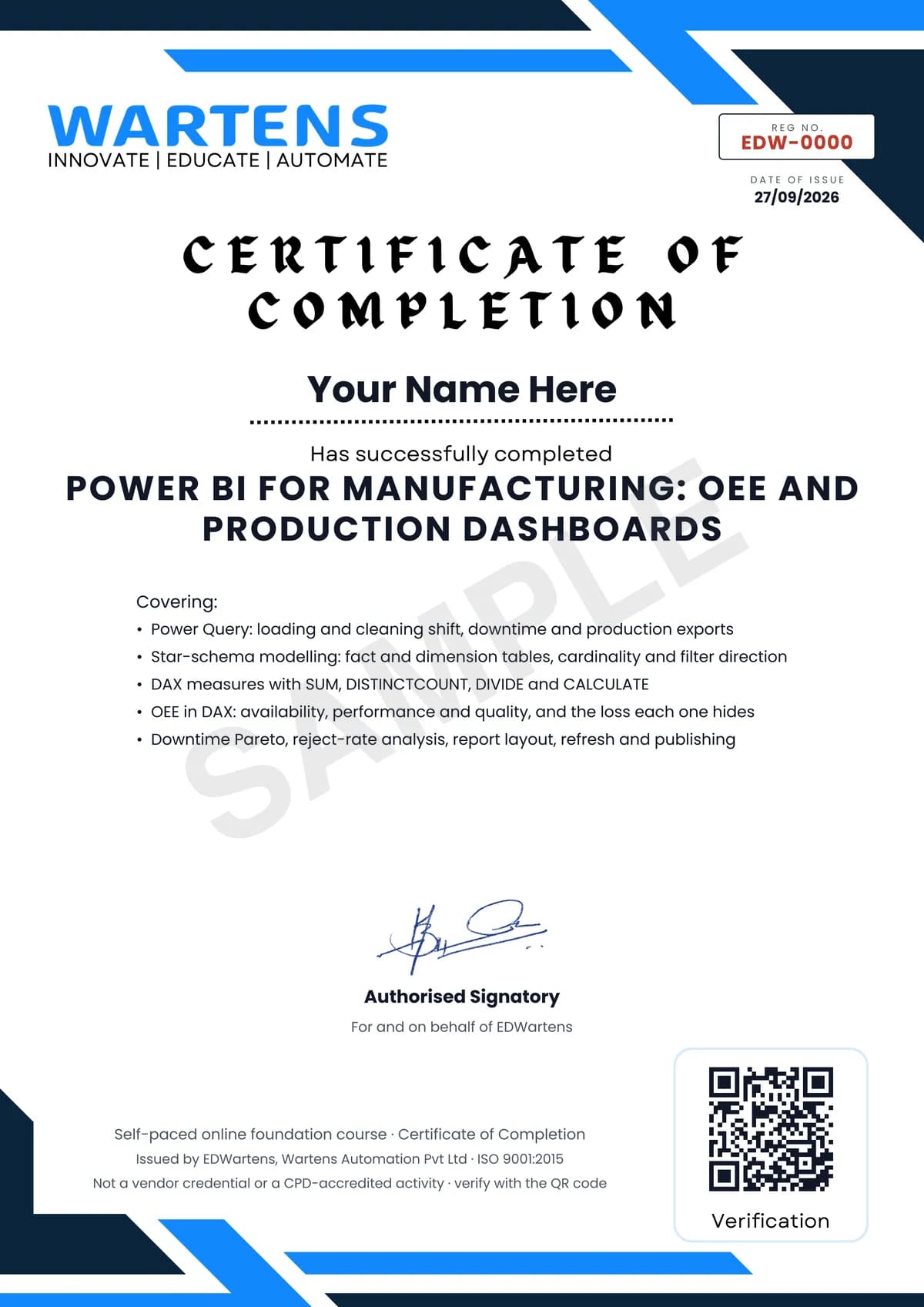
Verifiable by anyone
Adds to LinkedIn in one click
QR code on the certificate
Names what you can do
A permanent link
Earned, not attended
Learning is free. The certificate is optional.
Add it now and pay only when you have finished the course, or come back for it later. One-off, US$23.99, with a receipt.
Issued by EDWartens, the training division of Wartens, as a Certificate of Completion for this self-paced course. Sold by Wartens Ltd (England and Wales). It is not a vendor certification, a university award or a CPD-accredited activity, and it does not certify competence on live equipment. Delivered electronically; see the refund policy.
Credits
Who made the video lessons
The video lessons in this course were created by the people below, not by EDWartens. Every lesson streams from its creator's own YouTube channel; EDWartens neither hosts nor sells that footage, and the creators are not affiliated with EDWartens and do not endorse this course. What EDWartens wrote is the study plan, the notes, the practice tasks and the assessments.
- Chandoothe getting-started and vocabulary lessons, Power Query, the star schema and data modelling, the DAX and Power Pivot examples, chart choice and the visuals masterclass, tooltip pages, and the three full dashboard builds
- Learn Skills Dailythe Power BI Full Course ladder, used as a second pass over the workflow and as the walkthrough beside the OEE, Pareto and reject-rate modules
- CQE Academya lesson in "OEE: availability, performance and quality"
- PK: An Excel Experta lesson in "OEE: availability, performance and quality"
- Havens Consultinga lesson in "Downtime Pareto and reject analysis"
If you are one of these creators and would like a lesson removed or credited differently, write to info@wartens.com.