Instrumentation · Free
Instrumentation for PLC Engineers
The half of the loop that is not code. Follow one measurement from the transmitter in the field, down the 4-20 mA loop, into the analog card, through NORM_X and SCALE_X into engineering units, out again to a valve, and back to the control room when the reading is wrong.

Inside the course


From the lessons
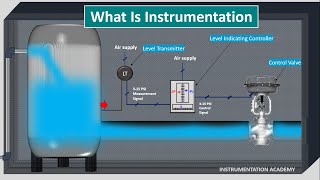
The Signal Path: Field Device to PLC to Valve
Instrumentation Academy

Transmitters: What the Field Device Actually Sends
Instrumentation Tools

The 4-20 mA Loop and How It Is Wired
Instrumentation Academy

Percent, Milliamps and Process Variable
Instrumentation Tools
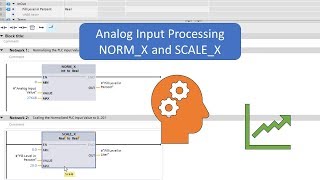
Into the PLC: Analog Cards, Raw Counts, NORM_X and SCALE_X
Hegamurl

Out of the PLC: Unscaling, I/P Converters and Valves
Hegamurl
Lesson frames belong to the creators named in the Credits below and are shown from YouTube.
What you will learn
Trace a control loop end to end and say who owns each part of it; read a transmitter's range and predict what the PLC will read at any current; wire two-, three- and four-wire transmitters and diagnose a loop from its current alone; convert between milliamps, percent and engineering units in both directions; scale an analog input with NORM_X and SCALE_X and unscale an output to a valve; build alarm levels with deadband and detect a transmitter you cannot trust; read a P&ID and an ISA tag; choose between a switch and a transmitter and wire PNP or NPN correctly; put PID_Compact on a real process variable; and work backwards from a wrong number on the HMI to the fault in the field.
- Trace one loop from sensing element to final element and say which half a wrong reading is in
- Read a transmitter's range and span, and work out the process variable at any current
- Wire two-, three- and four-wire transmitters, and tell a fault current from a measurement
- Convert between milliamps, percent of span and engineering units without looking anything up
- Scale an analog input with NORM_X and SCALE_X, and unscale a demand back out to a valve
- Alarm on the scaled value with a deadband, and hold a safe state when the signal cannot be trusted
- Read a P&ID and an ISA tag, and find the card and channel on the loop sheet
- Put PID_Compact on a real process variable, tune it, and say when a loop should not be PID at all
- Work backwards from a wrong number on the screen to the fault, cheapest check first
For you
Taking Instrumentation for PLC Engineers from the United States
- Free in the United States, as everywhere, and self-paced: lessons, notes and the final assessment are open at any hour, so your time zone and shift pattern do not matter.
- The optional certificate for learners in the United States is a one-off US$28.99. What you get for it
- Plants across the Americas most often run Allen-Bradley, Siemens and Inductive Automation; each has its own free course to take next.
- See automation and engineering jobs in the United States, and what the industry looks like in Houston, Detroit and Chicago.
- EDWartens also has a regional site for the United States, for classroom training and local support: edwartens.com/us.
The course project · about 16 hours
Twelve instruments into an S7-1200: the RO plant loop by loop, from index to loop check
Wire, scale, alarm and test twelve field instruments on a 20 m³/h reverse-osmosis water plant: pressure, differential pressure and level on two-wire loops, magnetic flowmeters and analysers on four-wire loops, a Pt100 on an RTD card, float and pressure switches and a PNP proximity sensor on sinking inputs, and two 4-20 mA outputs to a VFD and a control valve. You deliver the TIA Portal project, your own instrument index, I/O list, loop check and FAT record; the sample pack shows what the integrator handed over.
Sample document pack, 8 documents, filled in for the scenario
- Control narrativeControl Narrative: RO Plant RO-1
- Instrument indexInstrument Index: RO Plant RO-1
- I/O listI/O List: Panel CP-RO1
- Loop drawingInstrument Loop Diagrams: PT-102 (2-wire), FT-101 (4-wire), TT-101 (RTD)
- Cable scheduleInstrument and Control Cable Schedule: RO-1 Skid to Panel CP-RO1
- Calibration recordCalibration Record: PT-102 HP Pump Discharge Pressure Transmitter
- Loop checkLoop Check Sheets: CT-101 (4-wire) and TT-101 (RTD)
- FATFactory Acceptance Test Record: Panel CP-RO1
Read inside the course and download as a workbook. The project is optional practice, marked when you submit it; the certificate needs only the modules and the final assessment.
Course content
12 modules · 42 lessons · 6h 28m
In order, at whatever pace suits you. Each module ends with a practice task that builds on the last.
- 01The Signal Path: Field Device to PLC to Valve3 lessons25m
- 02Transmitters: What the Field Device Actually Sends4 lessons23m
- 03The 4-20 mA Loop and How It Is Wired5 lessons39m
- 04Percent, Milliamps and Process Variable4 lessons43m
- 05Into the PLC: Analog Cards, Raw Counts, NORM_X and SCALE_X3 lessons49m
- 06Out of the PLC: Unscaling, I/P Converters and Valves4 lessons35m
- 07Alarms, Interlocks and a Signal You Cannot Trust4 lessons39m
- 08Reading the Drawings: P&ID and the Loop Sheet3 lessons46m
Requirements
- Who it is for
- Intermediate. You can write ladder logic in TIA Portal and have met analog inputs. No instrumentation background assumed, and no maths beyond a straight line.
- Software
- TIA Portal V17+ (21-day trial) with S7-PLCSIM for the scaling, alarm and PID exercises. The instrumentation modules need nothing installed. What to download, and how
- Hardware
- None. A multimeter and a loop calibrator are useful if you have them, and every exercise is written to work without them.
Software you need
What to download, where from, what it costs and how to install it. Every link goes to the maker's own site, never a mirror.
The instrumentation modules need nothing installed. TIA Portal is for the scaling, alarm and PID exercises.
Required
- 01Free trial: 21 days
SIMATIC STEP 7 Professional and WinCC (TIA Portal) V21 Trial
Siemens
- Runs on
- Windows 11 Pro or Enterprise 64-bit (24H2), Windows 10 Enterprise 2021 LTSC, or Windows Server 2022/2025. Windows 11 Home is supported only for the Basic editions.
- Account
- A free Siemens account registered for Industry Online Support (SiePortal)
- Size
- about 8.1 GB for the main ISO, plus an optional 3.1 GB DVD 2 with hardware support packages
Siemens lets registered users download the V21 trial of STEP 7 (Basic and Professional), STEP 7 Safety and WinCC and test it for 21 days. The same package is used for the full product; after 21 days you need a purchased licence to keep working.
Steps
- 1.Open the Siemens trial page (entry 109989774) and sign in with your Siemens Industry Online Support account.
- 2.Download TIA_Portal_STEP7_Safety_WinCC_V21.iso (8.1 GB).
- 3.Download S7-PLCSIM_V21.iso (2.5 GB) from the same page: PLCSIM is a separate download.
- 4.Right-click each ISO, choose Mount, and run Start.exe as administrator. Install STEP 7 and WinCC first, then PLCSIM.
- 5.Follow the setup, accept the licence terms and restart the PC when asked.
- 6.Open TIA Portal V21 and create a new project to confirm it runs.
- Install from a local drive with plenty of free space; Siemens lists 20 GB free as the minimum and the ISOs alone are over 10 GB.
- You only need DVD 2 if you want extra hardware support packages.
- If you cannot install locally, Siemens also offers a 21-day TIA Portal Cloud trial in the browser (one-hour sessions, not in every country).
Official download pagesupport.industry.siemens.comAlternatives
- TIA Portal Cloud trial: 21 days free in a cloud virtual machine, no install. Sessions are limited to one hour and it is not available in every country.
- 02Free trial: 21 days
S7-PLCSIM V21 (TIA Portal) Trial
Siemens
- Runs on
- Windows 11 Pro or Enterprise 64-bit (24H2), Windows 10 Enterprise 2021 LTSC, or Windows Server 2022/2025. Windows 11 Home is supported only for the Basic editions.
- Account
- A free Siemens account registered for Industry Online Support (SiePortal)
- Size
- about 2.5 GB (ISO)
S7-PLCSIM V21 is offered as a 21-day trial on the same Siemens page as the STEP 7 and WinCC V21 trial. It needs STEP 7 V21 installed on the same PC.
Steps
- 1.Open the Siemens STEP 7 and WinCC V21 trial page (entry 109989774) and sign in.
- 2.Install STEP 7 V21 from the main TIA Portal ISO first.
- 3.Download S7-PLCSIM_V21.iso (2.5 GB) from the section Download S7-PLCSIM Standard V21.
- 4.Mount the ISO, run Start.exe as administrator and follow the setup.
- 5.In TIA Portal, select your CPU and click Start simulation to open PLCSIM.
- Siemens notes that the PLCSIM Standard V21 installation also includes S7-PLCSIM Advanced V8.0.
Official download pagesupport.industry.siemens.com
Checked against each maker's own page on 27 September 2026. Trial lengths and editions change; the maker's page is the final word.
Instrumentation for PLC Engineers at a glance
Instrumentation for PLC Engineers is a free, self-paced online course from EDWartens for engineering students, ITI and diploma holders, and working engineers in instrumentation and process plants. It has 12 modules and 6h 28m of video lessons by Instrumentation Tools, Instrumentation Academy, Hegamurl, with written notes and worked problems, a practical project with a document pack and a 15-question final assessment (pass mark 60%). Learning is free with an account; an optional certificate with a public verification code is issued when you pass. Last updated 27 September 2026.
All course factsHide course facts
- Price
- Free, for good. No trial, no card. The only paid item is the optional certificate, a small one-off fee.
- Who it is for
- Engineering students, ITI and diploma holders, and working engineers in instrumentation and process plants
- Format
- 12 self-paced modules, 6h 28m of video, written notes, a practice task per module and one final assessment.
- Level
- Intermediate. Intermediate. You can write ladder logic in TIA Portal and have met analog inputs. No instrumentation background assumed, and no maths beyond a straight line.
- Brand
- Vendor-neutral
- Software
- TIA Portal V17+ (21-day trial) with S7-PLCSIM for the scaling, alarm and PID exercises. The instrumentation modules need nothing installed.
- Hardware
- None. A multimeter and a loop calibrator are useful if you have them, and every exercise is written to work without them.
- Certificate
- Optional EDWartens Certificate of Completion, verifiable by code. Not a vendor credential.
- Video lessons by
- Instrumentation Tools, Instrumentation Academy, Hegamurl (independent creators, credited below)
- Language
- English
- Last updated
- 27 September 2026
A shareable EDWartens certificate
Finish every module and pass the final assessment, and the optional EDWartens certificate is yours. It carries a unique verification code on a public page anyone can check, so it stands up when a recruiter looks it up. See it below.
The course itself stays free whether or not you ever buy one.
Stuck? Ask a practising engineer
A free course usually means a comment section and hope. This one does not. Every module has an Ask-your-trainer panel that reaches the same engineers who teach our paid programme: people who commission panels for a living, not moderators.
Pairs well with
 PLC programming · FreeSiemens TIA PortalFrom zero electrical knowledge to a working, simulated S7-1200 program, for nothing.
 PLC programming · FreeSiemens TIA Portal in Three HoursThe first three hours of the Siemens TIA Portal course, cut to end on a win: what a PLC is, how it is wired, a project configured in TIA Portal, and your first ladder program running in simulation. Finish it in an evening or two, earn a certificate, and carry straight on into the full course.
 PLC programming · FreeTIA Portal: Build a MachineOne machine, start to finish. Take a bottle filling line from a written specification and an I/O list to a structured S7-1200 program with a fill station, a capper, a reject sorter and an operator screen with alarms, then test it against a written record and archive it for hand-over. The lessons are the reference; the machine is yours, and it is what you submit.
 Cybersecurity · FreeOT Security Assessment: Testing a Plant Without Stopping ItThe assessment half of OT security, for engineers who have to do it on a plant that is running. Rules of engagement first, then passive capture, careful enumeration, what an attacker does with a protocol that has no authentication, the Windows machines nobody mentions, the logging that would have caught it, and a report written in the language of consequence.
More free courses: Free instrumentation and process control courses
Learner reviews
No reviews yet
Reviews here are written only by learners who have finished every module of Instrumentation for PLC Engineers, and they are published exactly as written. Finish the course and yours will be the first.
Common questions
Is this an instrumentation course or a PLC course?
It is the join between them, written for the PLC side. There is a full Industrial Instrumentation course in this catalogue that covers pressure, level, flow and temperature measurement in depth, and this course does not repeat it. What this one does is follow one signal all the way through: what the transmitter sends, how the loop carries it, what the analog card turns it into, how you scale it, how you alarm on it, how it gets back out to a valve, and how you find the fault when the number is wrong.
I have never touched an instrument. Can I follow it?
Yes. Nothing about instrumentation is assumed, and the arithmetic is done in full every time rather than left as a formula. What is assumed is the programming side: you can write ladder logic in TIA Portal and you have seen an analog input before. If you have not, do the Siemens TIA Portal course first.
Do I need a multimeter, a loop calibrator or a real transmitter?
No. They help if you have them and the course points out where, but every exercise is written to be done with S7-PLCSIM and forced values instead. The scaling, alarm and PID work is all provable in simulation.
Do I need to buy TIA Portal?
No. Siemens publishes a free 21-day trial with S7-PLCSIM included, and it needs only a free Siemens account. Modules 1 to 4 need no software at all, so install it when you reach module 5.
Does it cover HART and fieldbus?
It covers what a PLC engineer meets: that HART rides on the same two wires as the 4-20 mA signal, what it lets somebody change in the field without telling you, and why that matters to your scaling. Configuring HART devices and designing fieldbus segments is instrument engineering and is not in this course.
Is the Instrumentation for PLC Engineers course really free?
Yes. Every module, every practice task and the final assessment. You create an account so your progress is saved and the assessments can be marked. The only paid item is the certificate, and only if you decide you want it.
What certificate does the Instrumentation for PLC Engineers course give?
An EDWartens Certificate of Completion, issued when you have worked through every module and passed the final assessment, with a unique number anyone can verify on our site. It is not a vendor credential and we will never describe it as one.
What you walk away with
Your certificate for Instrumentation for PLC Engineers
Finish the course, pass the final, and this is the document with your name on it.

Verifiable by anyone
Adds to LinkedIn in one click
QR code on the certificate
Names what you can do
A permanent link
Earned, not attended
Learning is free. The certificate is optional.
Add it now and pay only when you have finished the course, or come back for it later. One-off, US$28.99, with a receipt.
Issued by EDWartens, the training division of Wartens, as a Certificate of Completion for this self-paced course. Sold by Wartens Ltd (England and Wales). It is not a vendor certification, a university award or a CPD-accredited activity, and it does not certify competence on live equipment. Delivered electronically; see the refund policy.
Credits
Who made the video lessons
The video lessons in this course were created by the people below, not by EDWartens. Every lesson streams from its creator's own YouTube channel; EDWartens neither hosts nor sells that footage, and the creators are not affiliated with EDWartens and do not endorse this course. What EDWartens wrote is the study plan, the notes, the practice tasks and the assessments.
- Instrumentation Toolsthe 4-20 mA loop, transmitter wiring, the percent and process variable calculations, control valves, P&ID reading, calibration and the loop in a PLC or DCS
- Instrumentation Academythe animated fundamentals: what instrumentation is, pressure transmitters, why 4-20 mA, proximity sensors, I/P converters, positioners and P&ID drawings
- Hegamurlanalog processing in TIA Portal: NORM_X and SCALE_X, output unscaling, and PID_Compact with its tuning
If you are one of these creators and would like a lesson removed or credited differently, write to info@wartens.com.