PLC COUNTERS
PLC Counters CTU, CTD and CTUD Explained With a Video Demo
How CTU, CTD and CTUD counters work, how the same box-counting job looks in IEC 61131-3, Rockwell Logix and Siemens TIA Portal, and when a normal counter is too slow and you need a high-speed counter.
PLC counters count events. Each time the counter's input goes from off to on (a rising edge), the counter adds or subtracts one. A CTU counts up and switches its output on when the count reaches a preset, a CTD counts down and switches on at zero, and a CTUD does both. Counters are the standard way to count boxes, bottles, strokes or cycles in a PLC program.
This guide explains the three IEC 61131-3 counters, shows the same counting task in Rockwell Logix and Siemens TIA Portal, and covers the faults that catch beginners: reset, retention, bounce and pulses that are too fast. Then you can watch Tim Wilborne demonstrate CTU and CTD on a Micro800.
What is a PLC counter?
A counter is a function block or instruction with three essentials:
- A count input. CU for counting up, CD for counting down.
- A preset value (PV). The number you are counting to.
- A current value (CV). The number counted so far.
When the count reaches the preset, the output Q turns on. A reset input (R) sets the count back to zero.
The key word is edge. A counter does not count how long an input is on. It counts transitions from false to true. If a box sits in front of a photo-eye for two seconds, that is one count, not one count per scan. The CODESYS Standard library reference for CTU describes the CU input exactly this way: a rising edge increments CV by one.
If you already know timers, counters are the natural next step. Our post on PLC timers TON, TOF and TP uses the same IEC naming (IN, PT, Q, ET) that counters echo with CU, PV, Q and CV.
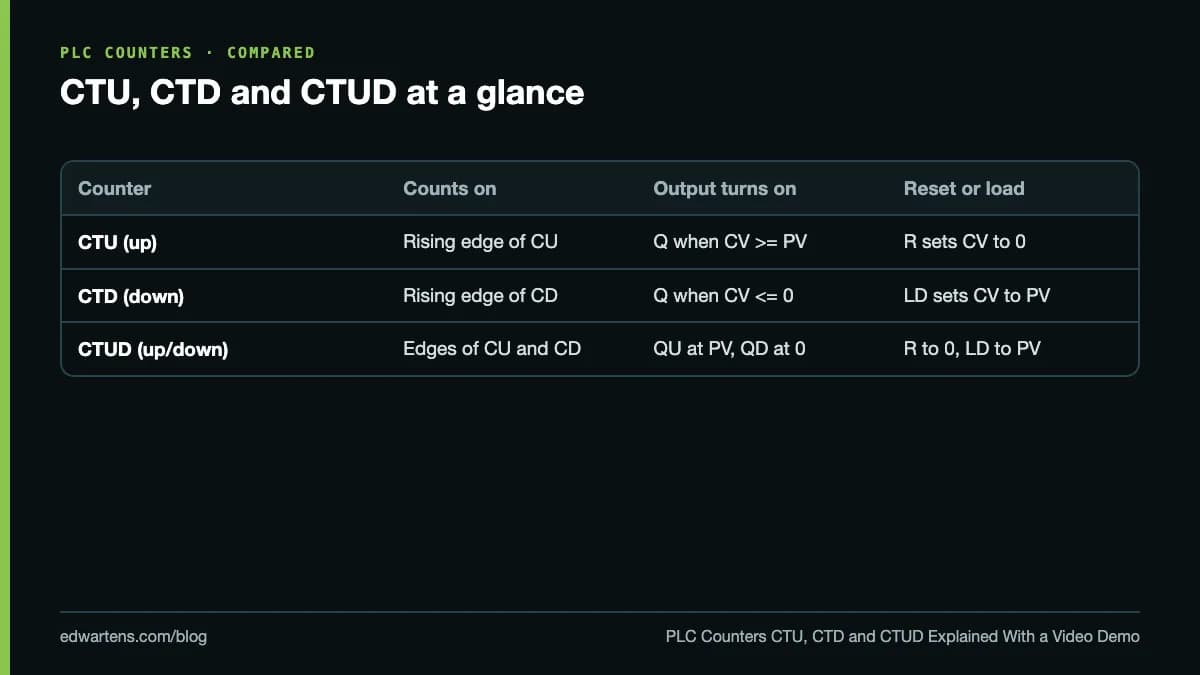
CTU, CTD and CTUD: how each counter works
CTU: count up
The CTU adds one on each rising edge of CU. Q turns on when CV is greater than or equal to PV. R resets CV to zero, and in the IEC 61131-3 reference behaviour reset takes priority over counting. Use it to count parts into a batch: when 24 bottles have passed, Q starts the case packer.
CTD: count down
The CTD subtracts one on each rising edge of CD. Its LD (load) input copies PV into CV, and Q turns on when CV reaches zero or below. Use it to count what is left: load 500 labels into a reel counter, count down with each label, and warn the operator at zero.
CTUD: count up and down
The CTUD has both CU and CD, both R and LD, and two outputs: QU (CV has reached PV) and QD (CV is zero or below). The classic use is a buffer or accumulation conveyor: count up at the infeed sensor, count down at the outfeed sensor, and CV is the number of products on the conveyor right now.
How do counters look in Rockwell, Siemens and CODESYS?
The idea is identical everywhere, but the names change.
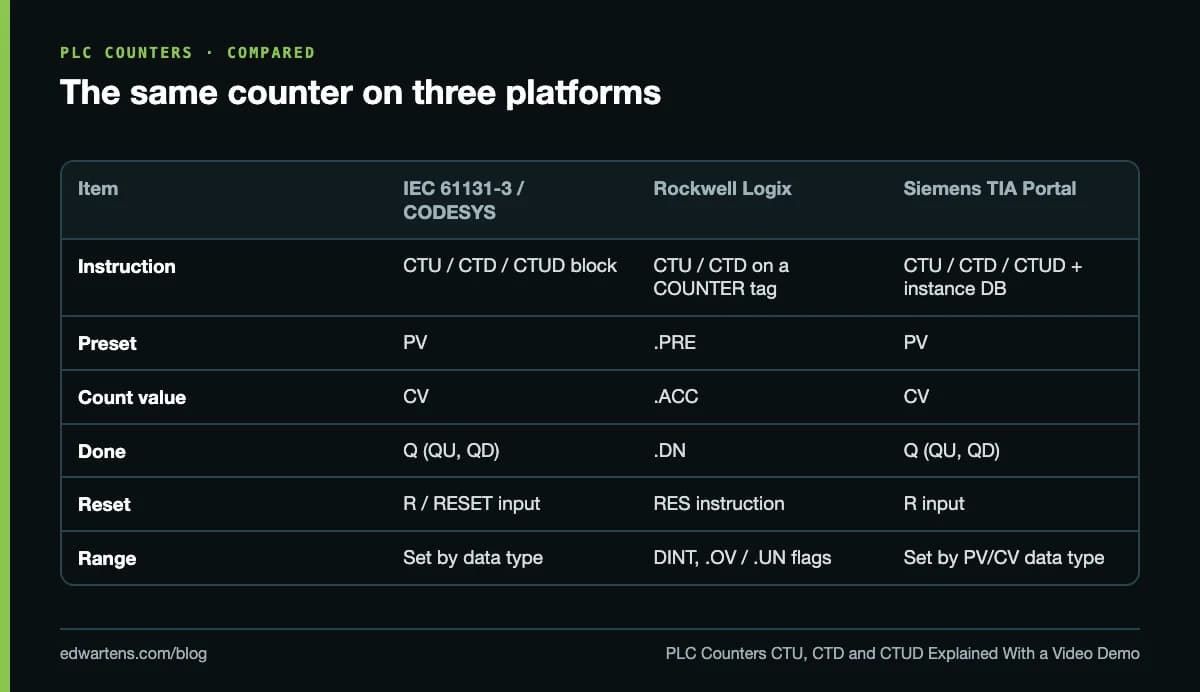
Rockwell Logix (Studio 5000). CTU and CTD are output instructions that act on a COUNTER tag. The tag holds .PRE (preset), .ACC (accumulated count) and status bits: .CU and .CD (the rung is enabled), .DN (done, the count has reached the preset), .OV and .UN. The count is a DINT, and Rockwell's instruction reference says .OV is set when the counter increments past 2,147,483,647 and .UN when it decrements past -2,147,483,648. You reset with a separate RES instruction addressed to the same tag. A CTU and a CTD can share one COUNTER tag to make an up/down counter.
Siemens TIA Portal (S7-1200 and S7-1500). Here you use the IEC counters CTU, CTD and CTUD. Each call gets an instance data block (or a multi-instance in the calling function block) that stores CV and the internal edge memory. The data type of PV and CV sets the range, so an INT counter stops at 32,767 while a DINT counter goes much further.
CODESYS, Beckhoff TwinCAT and other IEC platforms. The same CTU, CTD and CTUD blocks, declared as instances in the variable list. CODESYS names the reset input RESET rather than R in its Standard library. If you want to try this without hardware, our guide to learning IEC 61131-3 free with CODESYS shows how to set up the soft PLC.
A worked example: counting boxes into a case
A conveyor carries boxes past a photo-eye. Every 12 boxes, a pusher must fire to send the group to the case erector, and the count must start again.
The logic, written as rungs:
| Rung | Condition | Action |
|---|---|---|
| 1 | Photo-eye input I0.0 | CTU "BoxCount" counts up, PV = 12 |
| 2 | BoxCount.Q is on | Set Pusher output Q0.0 |
| 3 | Pusher-extended sensor I0.1 | Reset Pusher, reset BoxCount |
| 4 | Operator reset button I0.2 | Reset BoxCount |
What happens in practice:
- Boxes 1 to 11 each give one rising edge, and CV climbs to 11.
- Box 12 makes CV equal 12, so Q turns on and the pusher fires.
- When the pusher reaches its end position, rung 3 resets the counter to zero, which turns Q off.
- Box 13 becomes count 1 of the next case.
In Rockwell the same thing is a CTU on tag BoxCount with .PRE = 12, the pusher driven by BoxCount.DN, and a RES BoxCount on rung 3. The structure is the same; only the names change. Pairing the counter with a seal-in for the pusher is the same pattern as our start/stop seal-in circuit.
Watch: Micro800 counters in Connected Components Workbench
In this lesson from Tim Wilborne, about 20 minutes long, he explains and demonstrates the CTU and CTD counters on an Allen-Bradley Micro800 in Connected Components Workbench (CCW). Micro800 counters follow the IEC 61131-3 function block style (CU or CD, RESET or LOAD, PV, Q and CV), so what you see here carries over directly to CODESYS and TIA Portal. If you have never built a Micro800 project, start with our first Micro800 ladder program walkthrough and come back.
For further watching, Tim Wilborne's Studio 5000 CTU CTD Counter Explained shows the ControlLogix version with .ACC, .PRE and RES, and his Micro850 encoder high-speed counter setup is the natural next step.
Do PLC counters keep their value after a power cut?
This is one of the most common interview questions, and the honest answer is "it depends on the platform":
- Rockwell Logix keeps controller tag values through a power cycle, so a counter's .ACC is still there when the controller restarts, until something executes a RES.
- Siemens TIA Portal keeps an IEC counter's value only if its instance data is set as retentive. Check the Retain setting of the instance or the multi-instance.
- CODESYS keeps it only if the counter instance is declared in a RETAIN (or PERSISTENT) variable section.
For a production count or a maintenance cycle counter, make retention a deliberate choice and test it by cycling power during commissioning.
Why does my counter count wrong?
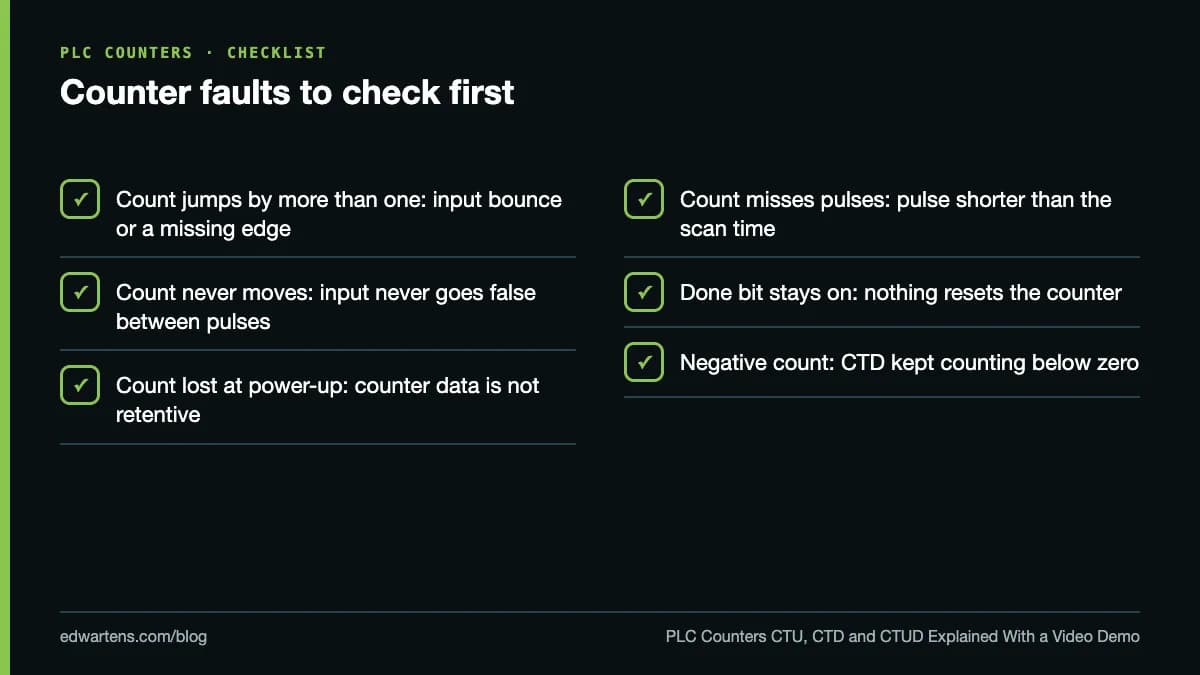
Most counter problems come down to the input signal, not the instruction.
Contact bounce. A mechanical limit switch can open and close several times in a few milliseconds. Each bounce is a rising edge. Increase the input filter time on the I/O card or use an electronic sensor.
No edge at all. If the input never goes false between products (two boxes touching end to end in front of the photo-eye), the counter sees one long pulse. Space the products or move the sensor.
Counting in more than one place. If you call the same counter instance twice in a scan, or use a coil instead of an edge on some platforms, the edge memory gets confused. Call each counter once.
Pulses that are too fast. See the next section.
When do you need a high-speed counter?
A normal counter is evaluated once per scan. To count a pulse, the PLC must see the input on in one scan and off in a later one. With a 10 ms scan, that means a pulse needs at least 10 ms on and 10 ms off: a theoretical ceiling of 50 pulses a second, and in practice less once input filtering is added.
Compare that with an incremental encoder. A 1,024 pulse-per-revolution encoder on a shaft turning at 1,500 rpm (25 revolutions a second) produces 25,600 pulses a second. No scan-based counter can follow that. You need the high-speed counter (HSC) inputs built into most compact PLCs, which count in hardware independently of the scan. The PLC program then reads the HSC value, compares it with presets, or uses it to calculate speed.
As a rule of thumb: photo-eyes on a conveyor, push buttons and cycle counts use normal counters; encoders, flow meter pulse outputs and fast product counting use an HSC.
Counter interview questions to be ready for
Counters come up in almost every junior PLC interview. Be ready to explain the difference between CTU and CTD, how a reset works on your platform, whether counts are retentive, and when an HSC is needed. Our PLC interview questions and answers has model answers for these and 25 more.
Practise counters free
The free Allen-Bradley Micro800 with Connected Components Workbench course includes this counter lesson and the RES and HSC lessons around it. CODESYS and IEC 61131-3 Programming teaches the IEC counters on a free soft PLC, and Siemens S7-1200 with TIA Portal covers the TIA Portal versions with PLCSIM. All of the learning is free; the optional EDWartens Certificate of Completion is the only paid item. To write the same logic as code, follow our structured text tutorial, and for the packaging lines where counters do much of the work, see our PACK EXPO 2026 preview.
Checked 5 October 2026 against the CODESYS, Rockwell Automation and IEC 61131-3 reference documentation listed below.
Take the free course

PLC programming · Beginner · Free
Allen-Bradley Micro800 with Connected Components Workbench

PLC programming · Beginner · Free
CODESYS and IEC 61131-3 Programming

PLC programming · Beginner · Free
Siemens S7-1200 with TIA Portal: The Tutorial Series

PLC programming · Beginner · Free
OpenPLC: IEC 61131-3 on Arduino, ESP32 and Raspberry Pi
Questions
What is the difference between CTU and CTD?
A CTU (count up) adds one to its count on every rising edge of its input and turns its output on when the count reaches the preset. A CTD (count down) subtracts one on every rising edge and turns its output on when the count reaches zero or below. CTD is usually loaded with the preset first, so it counts what is left.
How do you reset a PLC counter?
In IEC 61131-3 and Siemens TIA Portal you turn on the counter's R (reset) input, which sets the count back to zero. In Rockwell Logix you use a separate RES instruction that addresses the same COUNTER tag. A CTD or CTUD can also be loaded with the preset through its LD input.
Do PLC counters keep their value after power loss?
It depends on the platform and how the data is declared. Rockwell Logix keeps tag values, including a counter's accumulator, through a power cycle. In Siemens TIA Portal and CODESYS the count survives only if the counter's instance data is set as retentive, so check this on any counter that matters to production.
Why does my counter count more than once per pulse?
Usually because the input signal bounces, so the PLC sees several on-off transitions for one real event. A mechanical switch or a noisy sensor causes this. Use the input filter setting on the I/O card, a debounce timer, or a cleaner sensor.
When do I need a high-speed counter?
When pulses arrive faster than the PLC scan can see them. A normal counter needs the input to be seen on for at least one scan and off for at least one scan, so a 10 ms scan reliably counts well under 50 pulses a second. Encoders and flow meters need the hardware high-speed counter inputs instead.
Sources
- Fernhill Software: CTU up counter, IEC 61131-3 reference
- CODESYS online help: CTU in the Standard library
- Rockwell Automation: Count Down (CTD), Studio 5000 Logix Designer
- OpenPLC Editor: counter function blocks
- Tim Wilborne: Micro800 Counter CTU CTD Explained (video used in our course)
Written by the EDWartens engineering team for general education. Product names are trademarks of their owners; mentioning them does not imply endorsement. Prices and terms of other providers were checked on the date shown and can change.
What Is PLC Programming? A Complete Beginner's Guide

OpenPLC on a Raspberry Pi or Arduino: Build a Real PLC on a Hobby Board (Video)

PLC Programming Languages: Which One to Learn First in 2026

Free PLC Simulators Compared: PLCSIM, CCW, CODESYS, OpenPLC and Browser Simulators

Your First S7-1200 Program in TIA Portal and PLCSIM (Video)

Government Free Courses With Certificate vs Online Academies (India, Pakistan, Nigeria, Philippines)