STRUCTURED TEXT VIDEO
Structured Text Programming Tutorial: IF, CASE, Timers (Video)
A practical structured text tutorial with Tohid Alizadeh's free CODESYS lessons: the syntax, a ladder-to-ST translation table, five worked examples, and how Siemens SCL and Rockwell ST differ.
Structured text programming means writing PLC logic as text, in the high-level language defined by IEC 61131-3, instead of drawing ladder rungs. A line such as Motor := (Start OR Motor) AND NOT Stop; does the same job as a seal-in rung. ST uses := for assignment, IF ... THEN ... END_IF and CASE ... OF for decisions, and function block instances for timers and counters, and it suits maths, data handling and state machines.
Checked 5 October 2026 against the IEC 61131-3:2025 abstract and CODESYS and Rockwell documentation.
IEC published the fourth edition of the standard, IEC 61131-3:2025, on 22 May 2025. Its abstract lists the textual language structured text alongside the graphical languages ladder diagram and function block diagram, plus sequential function chart for structuring programs. Every major PLC platform supports ST under some name, which makes it the most portable PLC skill you can learn.
In this short first lesson, Tohid Alizadeh shows how to create a structured text program in CODESYS and introduces the main elements of the language. It is the first of a series in our free CODESYS and IEC 61131-3 Programming course. When you finish it, continue with his lessons on the IF-ELSIF instruction and on using TON and CTU function blocks in ST. CODESYS is free to download, so you can type along; our guide to free CODESYS training shows how to set it up.
What is structured text programming?
Structured text is one of the IEC 61131-3 PLC languages, and the textual one in the current edition. The CODESYS online help describes it as a language comparable with high-level languages such as C or Pascal, which permits the development of complex algorithms. In practice it looks like Pascal: typed variables declared in a VAR block, statements ending in a semicolon, and blocks closed with END_IF, END_CASE or END_FOR.
The code runs inside the normal PLC scan. Every cycle, the PLC reads inputs, executes your ST from top to bottom, then writes outputs. That matters: a loop that never ends does not just hang a function, it stops the whole controller with a watchdog fault.
For how ST compares with ladder, FBD and SFC, and which to learn first, see our guide to PLC programming languages.
Structured text syntax in five minutes
| Element | Example |
|---|---|
| Assignment | Speed := 1450; |
| Boolean logic | Run := Start AND NOT Fault; |
| Comparison | HighLevel := Level > 80.0; |
| IF | IF Temp > 60.0 THEN Fan := TRUE; END_IF; |
| IF with ELSIF and ELSE | IF A THEN ... ELSIF B THEN ... ELSE ... END_IF; |
| CASE | CASE Step OF 0: ... 10: ... END_CASE; |
| FOR loop | FOR i := 1 TO 10 DO Total := Total + Data[i]; END_FOR; |
| Function block call | T1(IN := Start, PT := T#5S); |
| Comment | // single-line comment |
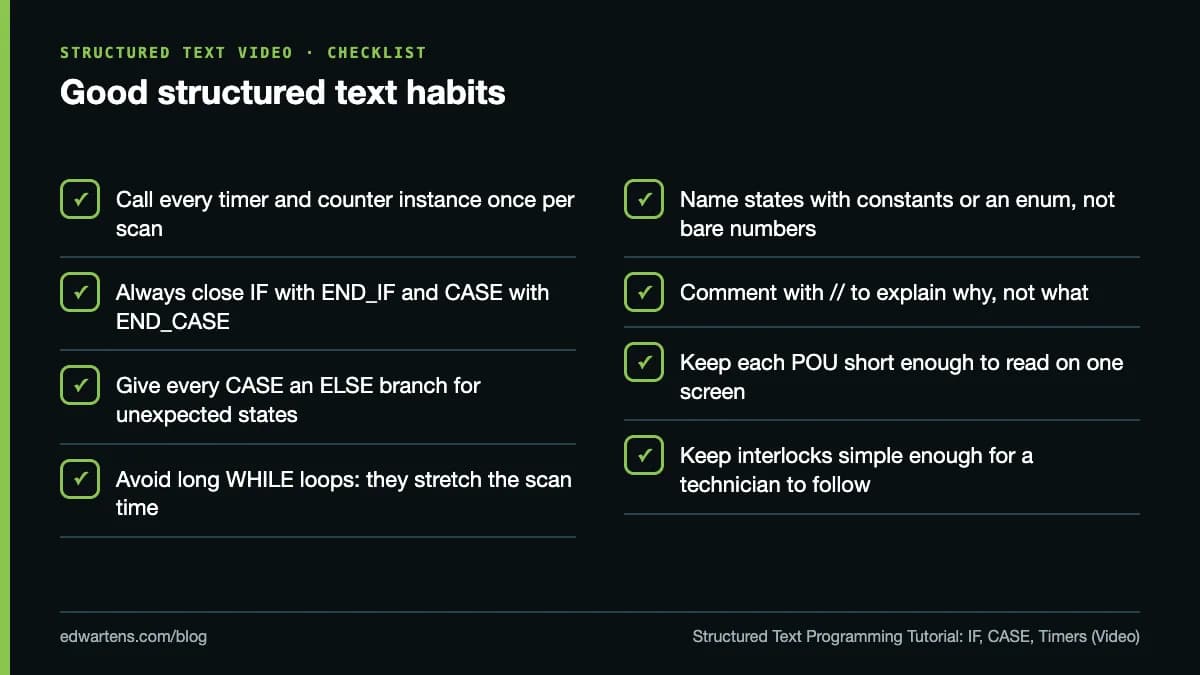
Two points catch people from other languages. Assignment is := and comparison is =, so IF A = B THEN is a comparison. And a function block such as a timer is an instance with memory: you declare it in VAR, call it once per scan, and read its outputs afterwards.
Translating ladder logic to structured text
If you already write ladder, the fastest way into ST is to translate rungs you know. Our start/stop seal-in walkthrough and the guide to PLC timers TON, TOF and TP explain the ladder side.
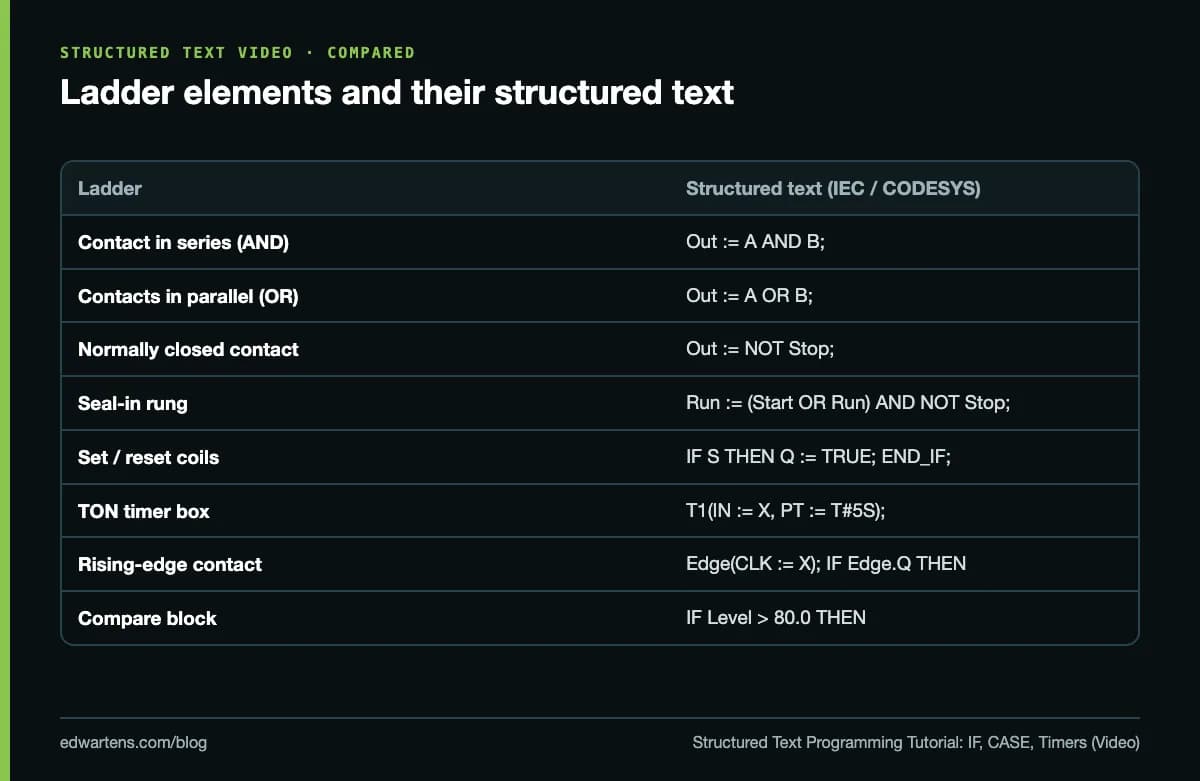
Five structured text examples
1. Motor start/stop with overload
| Line | Code |
|---|---|
| 1 | Motor := (Start OR Motor) AND NOT Stop AND NOT Overload; |
One line, the same logic as a seal-in rung. Wire Stop and Overload as normally closed in the field and invert in the code to match your plant's convention.
2. Tank fill with hysteresis
| Line | Code |
|---|---|
| 1 | IF Level < 20.0 THEN |
| 2 | Pump := TRUE; |
| 3 | ELSIF Level > 80.0 THEN |
| 4 | Pump := FALSE; |
| 5 | END_IF; |
Between 20% and 80% nothing is assigned, so Pump keeps its last value. That gap is the hysteresis that stops the pump chattering.
3. Delay with a timer
| Line | Code |
|---|---|
| VAR | DelayTimer : TON; END_VAR |
| 1 | DelayTimer(IN := StartRequest, PT := T#5S); |
| 2 | Horn := StartRequest AND NOT DelayTimer.Q; |
| 3 | Motor := DelayTimer.Q; |
A start warning: the horn sounds for five seconds, then the motor runs. The TON instance is called every scan, whatever happens elsewhere in the code.
4. A CASE state machine
| Line | Code |
|---|---|
| 1 | CASE Step OF |
| 2 | 0: IF StartPB THEN Step := 10; END_IF; |
| 3 | 10: FillValve := TRUE; IF LevelHigh THEN FillValve := FALSE; Step := 20; END_IF; |
| 4 | 20: Mixer := TRUE; MixTimer(IN := TRUE, PT := T#30S); IF MixTimer.Q THEN Step := 30; END_IF; |
| 5 | 30: Mixer := FALSE; MixTimer(IN := FALSE); Step := 0; |
| 6 | ELSE Step := 0; |
| 7 | END_CASE; |
This is where ST is far clearer than ladder. Each step is one branch, and the CASE selector, here Step, says exactly where the sequence is. The CODESYS help documents the CASE instruction, including the ELSE branch for values no case matches. Numbering steps in tens leaves room to insert steps later.
5. Scaling an analogue input
| Line | Code |
|---|---|
| 1 | Pressure := INT_TO_REAL(RawCounts) / 27648.0 * 10.0; |
On a Siemens S7-1200 or S7-1500, 4 to 20 mA arrives as 0 to 27,648 counts; this converts it to 0 to 10 bar. Our guide to the 4-20 mA current loop explains where the counts come from.
How do CASE and IF differ in structured text?
Use CASE when one integer variable picks one of several branches: a step number, a mode selector, a recipe number. Use IF when the decision depends on several variables or on ranges. A long chain of ELSIFs testing the same variable is a sign that CASE would read better.
Structured text in Siemens, Rockwell and CODESYS
The language is standard; the details are not.
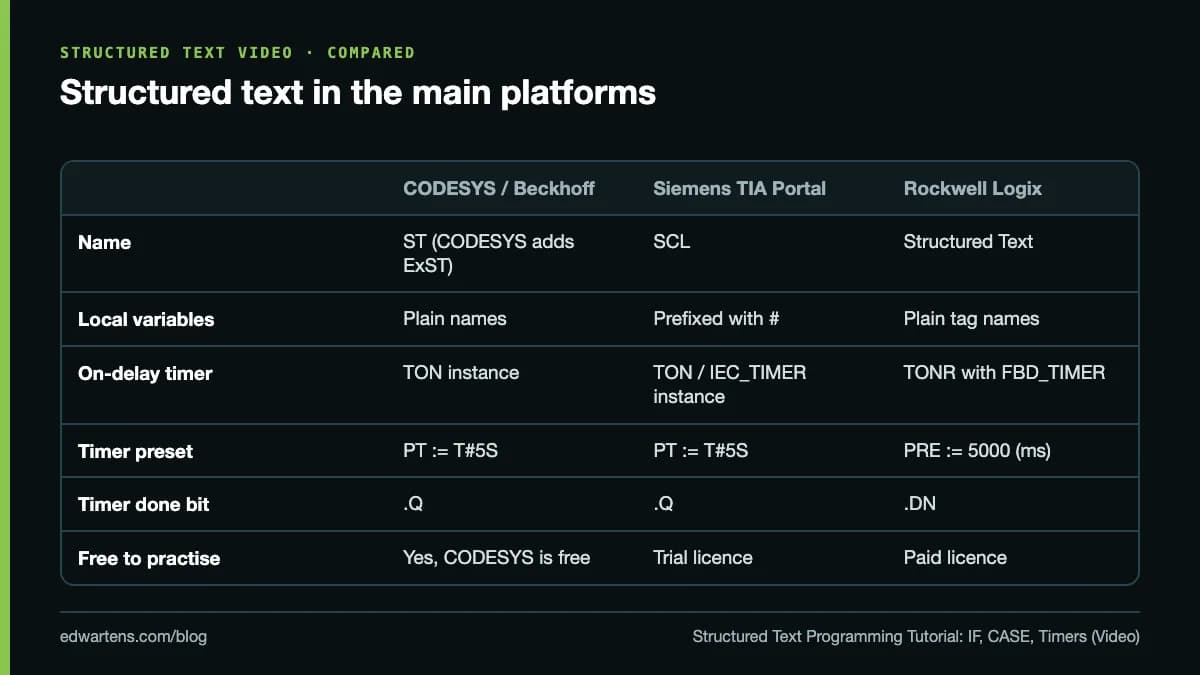
- CODESYS and Beckhoff TwinCAT 3 follow the standard closely. CODESYS also offers Extended Structured Text (ExST), its own extension of the standard.
- Siemens calls its version SCL. In TIA Portal, local variables carry a # prefix, so a timer call reads #DelayTimer(IN := #Start, PT := T#5S);.
- Rockwell Logix controllers use a different timer in ST. Rockwell's documentation for the TONR instruction shows it used with an FBD_TIMER tag: set .TimerEnable and .PRE (in milliseconds), call TONR(tag);, then read .DN.
Should you learn structured text or ladder first?
If you are a maintenance technician, start with ladder: it is what you will be fault finding at 3 a.m. If you come from software, or work on machines with recipes, motion and data, start with ST. Either way, learn the other one next. ST is the everyday language on CODESYS and TwinCAT platforms, which are common in European machine building, while plants standardised on Rockwell tend to lean more on ladder.
AI assistants now write ST well, and that is a reason to learn it properly, not to skip it: someone still has to review the code. Our guide to AI copilots for PLC programming covers what the vendor tools do, and our free Structured Text Generator drafts code you can study and test.
Where to practise structured text free
- CODESYS. Download the CODESYS Development System from the CODESYS Store, take CODESYS and IEC 61131-3 Programming, which includes this lesson series, and run everything on the soft PLC.
- Siemens. Siemens SCL Structured Text in TIA Portal covers SCL with PLCSIM.
- Beckhoff. Beckhoff TwinCAT 3 PLC Programming has a full structured text series from first program to CASE, timers and counters; our PLC counters guide compares CTU, CTD and CTUD across vendors.
- Rockwell. Allen-Bradley Studio 5000 Advanced includes structured text in Logix.
All are in the IEC 61131 software PLCs path and the PLC courses. They are free; an optional EDWartens Certificate of Completion, from US$2.99, is issued after you pass the final assessment and can be checked at edwartens.com/verification. It is not a vendor certification and is not accredited.
Take the free course


Questions
Is structured text harder than ladder logic?
For maths, data handling, loops and state machines it is usually easier, because one line of ST can replace several rungs. For simple interlocks and for fault finding by maintenance technicians, ladder is often clearer. Most engineers end up using both, often in the same project.
Is Siemens SCL the same as structured text?
Essentially yes. SCL is Siemens' name for its implementation of IEC 61131-3 structured text, with Siemens-specific details such as the # prefix on local variables in TIA Portal. Code moves between SCL and CODESYS ST with small edits.
How do you write a timer in structured text?
Declare an instance of the timer function block, call it every scan with its input and preset, then read its output. In CODESYS: declare T1 : TON; then write T1(IN := Start, PT := T#5S); and use T1.Q. Rockwell Logix uses TONR, with TimerEnable, PRE in milliseconds and the DN bit.
When should you use CASE instead of IF in structured text?
Use CASE when one integer variable selects one of several branches, such as the step number of a sequence or a machine state. It is easier to read than a chain of ELSIFs and makes state machines simple to follow. Use IF for conditions on several variables or ranges.
Can I learn structured text for free?
Yes. The CODESYS Development System is free to download and includes a soft PLC you can run on your own PC, so you can write and test structured text without hardware. The free CODESYS course on EDWartens is built around that setup.
Is structured text like Pascal or Python?
It is closest to Pascal: CODESYS describes it as comparable to high-level languages such as C or Pascal, and it uses := for assignment, IF ... THEN ... END_IF blocks and typed variable declarations. If you know Python, the logic is familiar, but ST is strongly typed and runs cyclically in the PLC scan.
Sources
- Tohid Alizadeh: CODESYS Structured text (ST) programming, first lesson
- IEC 61131-3:2025 Programmable controllers, Part 3: Programming languages
- CODESYS online help: Structured Text (ST) and Extended Structured Text (ExST)
- CODESYS online help: the CASE instruction
- Rockwell Automation: Timer On Delay with Reset (TONR), Logix Designer
- CODESYS Store: CODESYS Development System (free download)
Written by the EDWartens engineering team for general education. Product names are trademarks of their owners; mentioning them does not imply endorsement. Prices and terms of other providers were checked on the date shown and can change.
What Is PLC Programming? A Complete Beginner's Guide

Free PLC Simulators Compared: PLCSIM, CCW, CODESYS, OpenPLC and Browser Simulators

How Long Does It Take to Learn PLC Programming? A Week-by-Week Plan
Contactor vs Relay: Differences, Ratings and When to Use Each
RS-485 Wiring Explained: Termination, Biasing and Daisy Chains (Video)
Star-Delta Starter Explained: Power Circuit, Control Circuit and Timer Setting (Video)