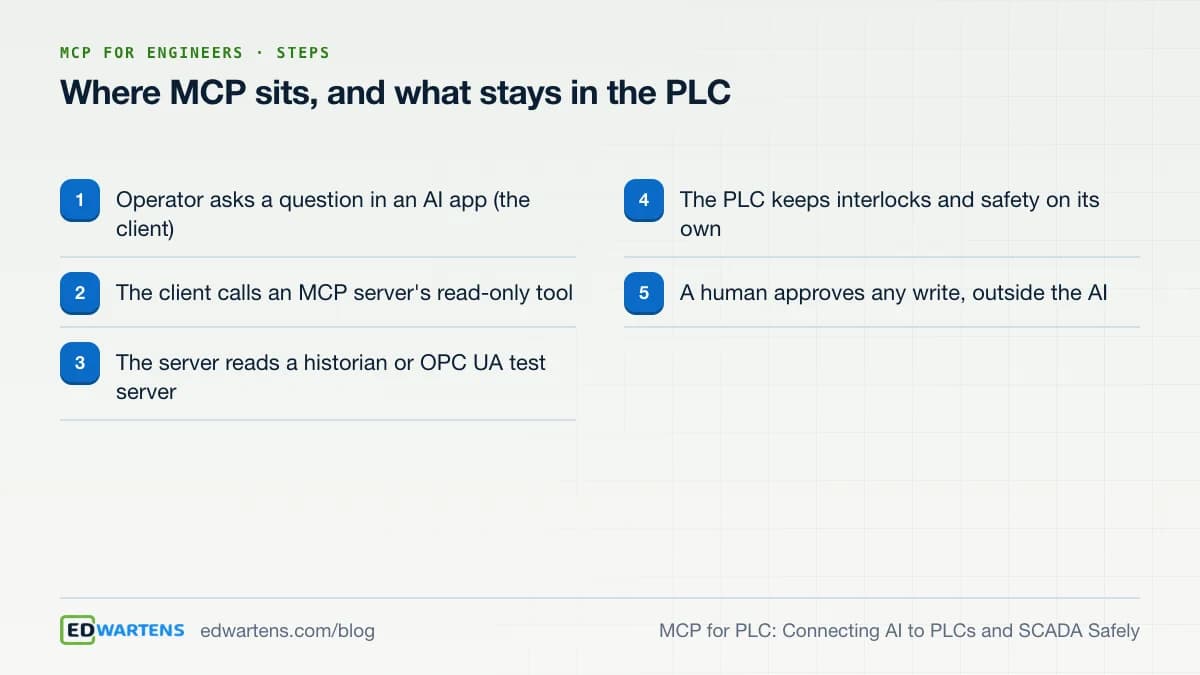
MCP for PLC means using the Model Context Protocol, an open standard for connecting AI applications to external systems, as a controlled layer between an AI assistant and plant data. The safe pattern is simple: the AI app asks, a narrow read-only MCP server answers from a historian or a test server, the PLC keeps its own interlocks and safety functions, and a human approves anything that writes. This guide explains the idea in plain words, shows where it sits in a plant, and lists what goes wrong when it is done carelessly.
We do not claim an AI can safely run a plant. Nothing here is a design for a production system, and we have not tested any vendor's MCP server.
MCP for PLC in one paragraph
The Model Context Protocol site describes MCP as "an open-source standard for connecting AI applications to external systems". It compares it to a USB-C port: one connector that many devices share. AI clients such as Claude, ChatGPT, VS Code and Cursor can speak it, and the site has its own security best-practices page, which you should read before building anything. We read the page on 23 November 2026.
Before MCP, each AI app needed custom code to reach each data source. With MCP, a server publishes a list of tools (things the AI may call, such as "read this tag") and the AI app calls them in a standard way. The video below explains how it works in under eight minutes.
What changes in a plant
MCP adds one new layer. It does not replace anything you already run.
| Role | In a plant it could be | Its job |
|---|---|---|
| Client (host) | An AI assistant app on an engineer's PC | Takes the question and decides which tool to call |
| MCP server | A small program you write or install | Publishes tools and runs them against a data source |
| Data source | A historian, an OPC UA test server, a CSV of alarms | Holds the data the tool reads |
| PLC | The controller on the machine | Runs the process and enforces safety |
The Control Design article of 14 August 2026 describes MCP as a middle layer: the AI is the client, and PLC and robot capabilities appear as tools. It says the AI cannot bypass the MCP middleware to reach hardware, and that the PLC can validate parameters coming in. That holds only if your network is built so there is no other path from the AI app to the controller, which is a network design decision, not something MCP provides. The article gives timing figures with no outside source, so we do not repeat them.
What vendors have shipped so far
Several automation and industrial software vendors have announced MCP servers or integrations in 2026. We are not naming a feature list because we have not tested them and could not open every vendor page. Our post on AI copilots for PLC programming mentions a CODESYS add-on, which is a programming helper, a different thing from a server that reads live plant data.
Research is also moving. An arXiv paper from 25 March 2026, IndustriConnect, proposes MCP adapters for Modbus, MQTT with Sparkplug B and OPC UA. It was evaluated on 870 deterministic runs and 2,820 tool calls using mock endpoints. That tells you the adapters behaved correctly against simulations. It does not tell you how they behave in a live plant.
When you evaluate any product, ask five questions: what does it expose, can it write, what is logged, where does it run, and who patches it.
The safety rule: read first, write never
Start with read-only tools. Reading a tag, a trend or an alarm list cannot move a valve. Writing can. So the rule is:
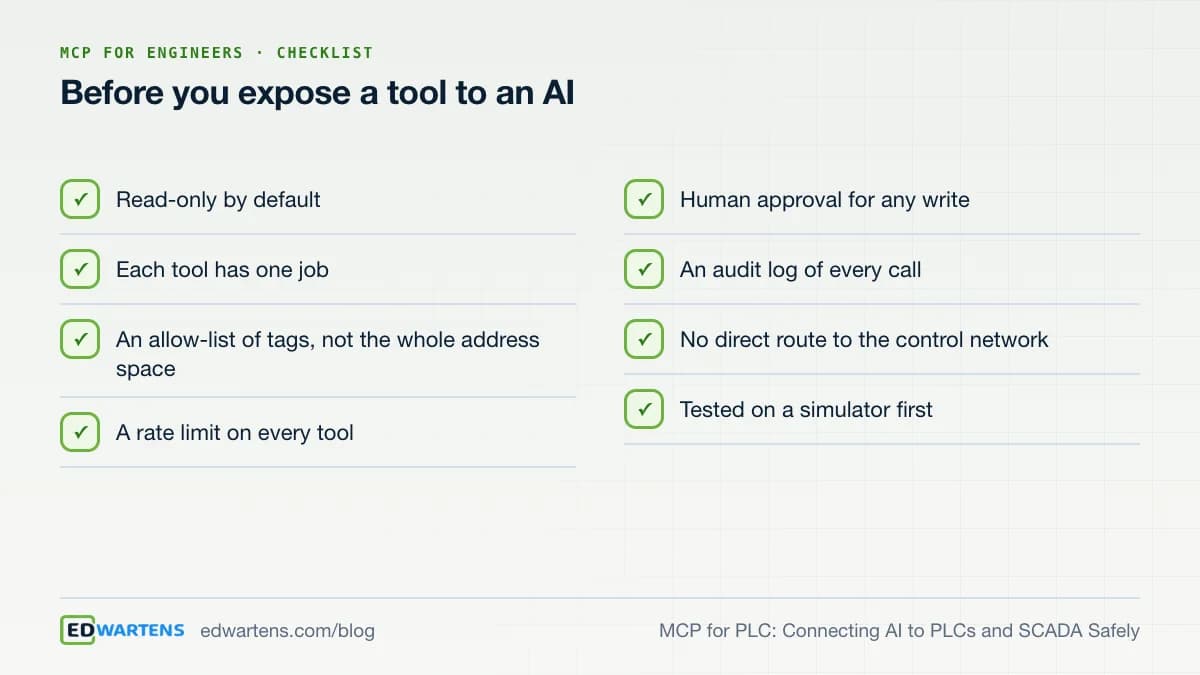
- Read-only by default. Every tool in the first version only reads.
- Human approval for any write. The approval happens outside the AI, for example in the operator's own system, so the AI cannot approve itself.
- Safety stays in the PLC. Interlocks, limits and safety functions are in the controller or the safety system, never in an AI prompt.
- Narrow tools. One tool, one job, with a fixed set of allowed tags.
If you remember one sentence: an AI app may suggest, the PLC decides.
Five things that go wrong
| Failure | What happens | What to do |
|---|---|---|
| Prompt injection | Text in a document or alarm message tells the AI to do something | Treat tool results as data, keep tools read-only, review writes |
| Over-broad tools | A tool can read or write any tag | Use an allow-list and one job per tool |
| No audit log | Nobody can tell what the AI called | Log every call with time, tool and arguments |
| Stale data | The AI answers from old values and sounds sure | Return a timestamp with every value |
| Network exposure | The server is reachable from places it should not be | Keep it off the control network, behind a firewall zone |
The last row ties to network design. A plant network is drawn in levels, and what may talk to what is decided by zones and conduits. If you want to learn that, read the Purdue model explained and cybersecurity in industrial automation.
How MCP compares with an API and OPC UA
These are not rivals. They sit at different layers. OPC UA moves plant data between systems (see OPC UA vs MQTT). An API is any interface a program offers. MCP is a common way for an AI app to call tools. An MCP server often sits in front of an OPC UA server or an API.
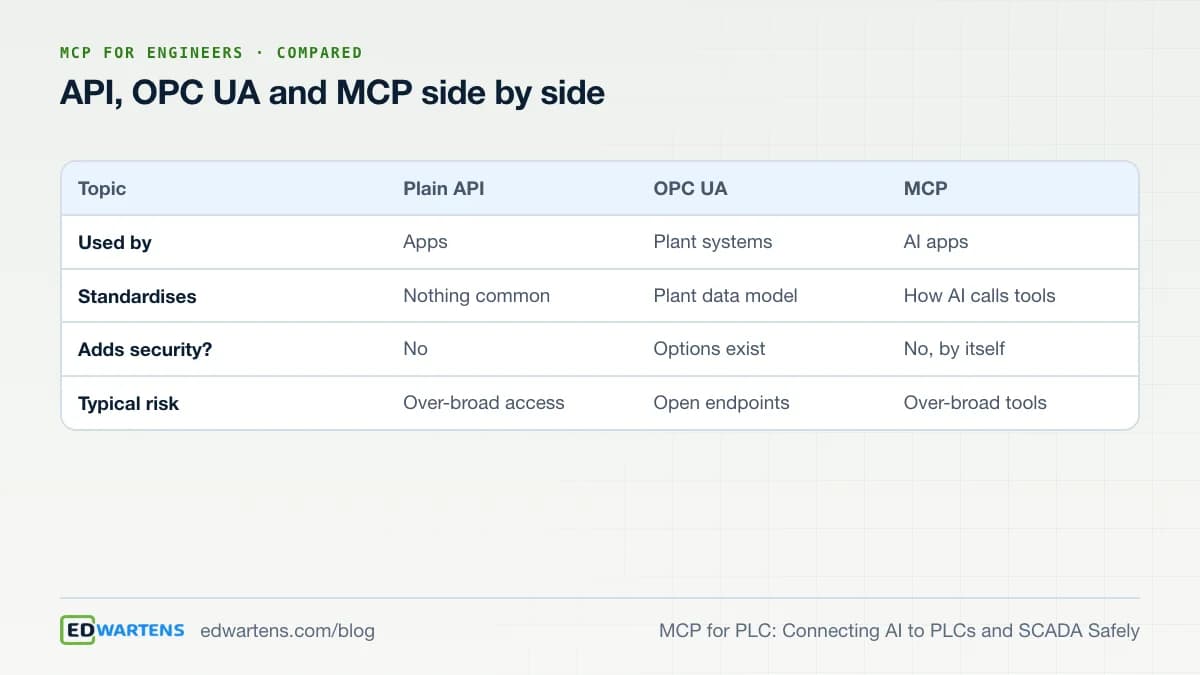
MCP does not add security by itself. The security comes from what you expose, how you authenticate, where it runs and what you log.
A small, safe first project
You can learn the pattern without touching a real plant.
- Run an OPC UA test server, or use a CSV of sample alarms and tag values.
- Write an MCP server with two read-only tools: "list tags" and "read tag".
- Add an allow-list of five tags and a rate limit.
- Log every call to a file.
- Connect an AI app and ask it questions, then try to make it do something it should not, such as reading a tag outside the list.
- Write down what broke, and fix it.
Here is an illustrative allow-list for step 3, built for a made-up pump station. It is an example, not a recommendation for your plant.
| Tool | Tag or action | Allowed? | Reason |
|---|---|---|---|
| read_tag | Pump1_Speed | Yes | Read only, on the list |
| read_tag | Tank1_Level | Yes | Read only, on the list |
| read_tag | Pump1_Run_Cmd | No | Command tags stay out of reach |
| write_tag | any | No | No write tool exists in version one |
| list_alarms | last 20 active | Yes | Read only, rate limited |
Notice that the write row is not "needs approval". It is "does not exist". The safest write tool is the one that is not there. If you later add one, it should go through a separate approval step that the AI cannot reach.
Step 5 is the learning. If the AI can get past your allow-list, your tool is too broad. For the data side of this, the data engineering for industrial AI post shows how plant data is prepared.
Regulation is arriving too. Our post on EU AI Act and digital omnibus deadlines is a starting point for the legal side.
Learn it free
The free AI Agents and MCP for Engineers course teaches hosts, clients, servers and the MCP primitives, and assumes you can read a short Python program. Pair it with AI for Industrial Automation, AI Security and the OWASP Top 10 for LLMs and Industrial DataOps with OPC UA, MQTT and Unified Namespace. The AI course hub lists the rest, and the best free AI courses for engineers are compared in this guide.
To practise, the AI Workbench lab lets you prepare data, train a model and check it against a brief, and the OT security lab lets you segment a plant network. Both are free with a free account and run in the browser. The AI and LLM Application Engineer job simulation has you build and evaluate an LLM assistant and then handle a prompt-injection incident, as a working day at a simulated company. It is practice, not employment. The free AI internships run for 4 weeks online as a training programme, with no stipend.
If you want to move into industrial security, read our OT security career guide.
Every course is free to learn in full. The optional certificate of completion for an intermediate course is a one-off US$10.99, and anyone can check it on the verification page. It is an EDWartens certificate, not a vendor credential.
Practise with us
Internship
Generative AI and Prompt Engineering
Free internship: 4 weeks, a free certificate and nothing to buy. The Engineer-verified internship adds an engineer's review and the graded certificate.
See the internshipRoles
Generative AI
Roles that ask for this skill, 139 open in this country now. Free to see and to apply. We are not a recruitment agency.
See rolesTake the free course
 Free
AI and machine learning · Intermediate · Free
AI Agents and MCP for Engineers
 Free
AI and machine learning · Intermediate · Free
AI for Industrial Automation
 Free
AI and machine learning · Intermediate · Free
AI Security and the OWASP Top 10 for LLMs
 Free
IIoT · Intermediate · Free
Industrial DataOps: OPC UA, MQTT and Unified Namespace
Questions
What is MCP (Model Context Protocol) in simple terms?
The MCP site calls it an open-source standard for connecting AI applications to external systems, like a USB-C port for AI. An AI app that speaks MCP can use tools and data from any MCP server without custom code for each one.
Can an AI control a PLC through MCP?
Technically a server could expose a write tool, but it should not be your starting point. Begin read-only. Any write should need human approval outside the AI, and the PLC must still enforce its own limits, interlocks and safety functions.
Is it safe to connect ChatGPT or Claude to a PLC?
Not directly and not by default. An AI app should reach plant data only through a narrow, read-only, logged MCP server on a test or monitoring network, never straight to the control network. Prompt injection and over-broad tools are the main risks.
How is an MCP server different from an API or OPC UA?
An API or OPC UA server exposes data to software in its own way. An MCP server wraps tools in a common form AI apps already understand. It can sit in front of an API or an OPC UA server, and it does not add security by itself.
Which PLC and SCADA vendors support MCP?
Several automation vendors have announced MCP servers or integrations in 2026. We have not tested any, so read each vendor's own documentation for what its server exposes, whether it can write, and what logging it provides before you rely on it.
Do I need to code to use MCP with industrial data?
Using an existing MCP server needs little code. Building a safe one for your plant usually needs a short program, for example in Python, plus security and testing work. The EDWartens AI Agents and MCP course assumes you can read a short Python program.
Sources
- Model Context Protocol: What is the Model Context Protocol (MCP)? (read 23 November 2026)
- Control Design: What is MCP and how does it connect AI to PLCs, 14 August 2026 (read 23 November 2026)
- arXiv 2603.24703: IndustriConnect, MCP Adapters and Mock-First Evaluation for AI-Assisted Industrial Operations, 25 March 2026 (read 23 November 2026)
Written by the EDWartens engineering team for general education. Product names are trademarks of their owners; mentioning them does not imply endorsement. Prices and terms of other providers were checked on the date shown and can change.

Free Learning Paths to a Controls, Automation or Industrial AI Role: Plan a Self-Taught Route
HMI vs SCADA: What Is the Difference?

PLC vs DCS: Differences and When to Use Each
A Free Industrial Automation Course With Certificate: A 12-Week Curriculum

Automation Engineer Career Guide 2026: Roles, Skills and a Free Learning Route

Edge AI in Industrial Automation: When to Run Models on the Plant Floor