
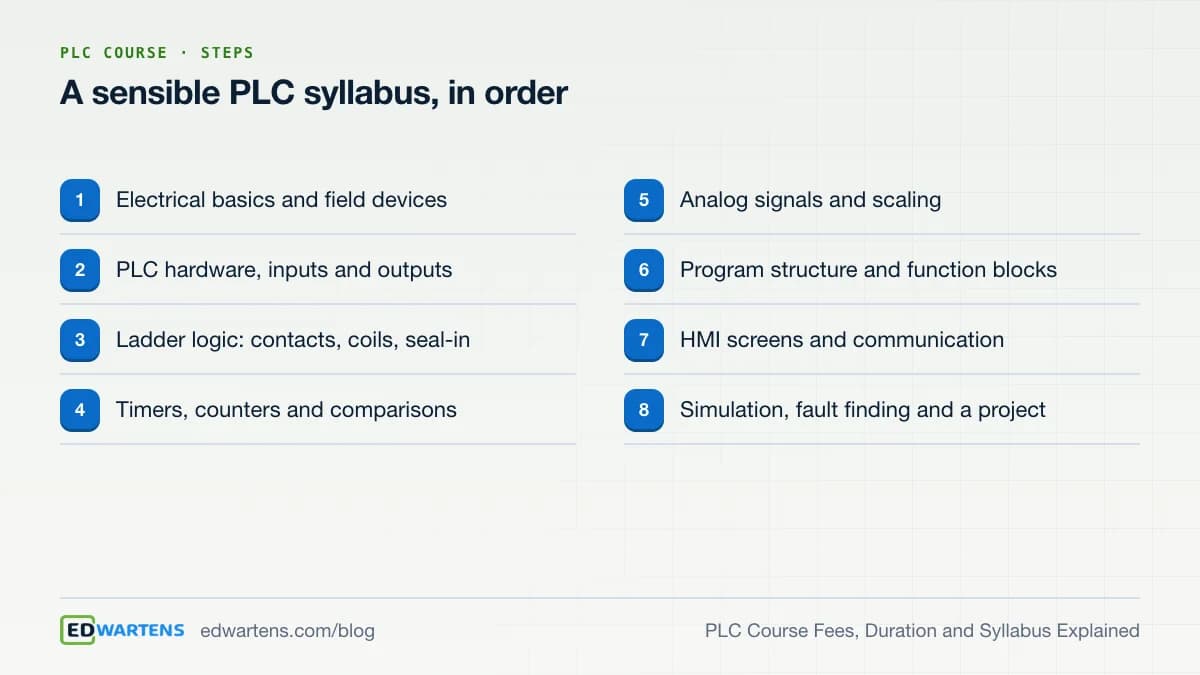
PLC course fees vary by provider, from nothing for a free online course to a larger sum for a classroom programme, and a beginner course on one PLC brand usually takes about 6 to 12 weeks. The syllabus should run from electrical basics and I/O to ladder logic, timers, analog signals, program structure, an HMI screen and a finished project. This guide explains each of the three questions in turn.
How much does a PLC course cost?
There is no single price, and quoting one would be a guess. Fees for PLC training depend on the provider, the country, whether it is live or recorded, how many PLC brands it covers and whether it includes hardware time. When you compare, ask what the fee actually pays for.
At EDWartens the PLC courses are free to join, and so is the learning. Examples are the Siemens TIA Portal course, the CODESYS and IEC 61131 course and the OpenPLC course. The certificate of completion is optional and paid. It is a one-off US$8.99 for a beginner course, shown in your own currency before you pay, and anyone can check it at /verification. You can read more on the certificate page.
Whatever you choose, look at the six places where cost can hide.
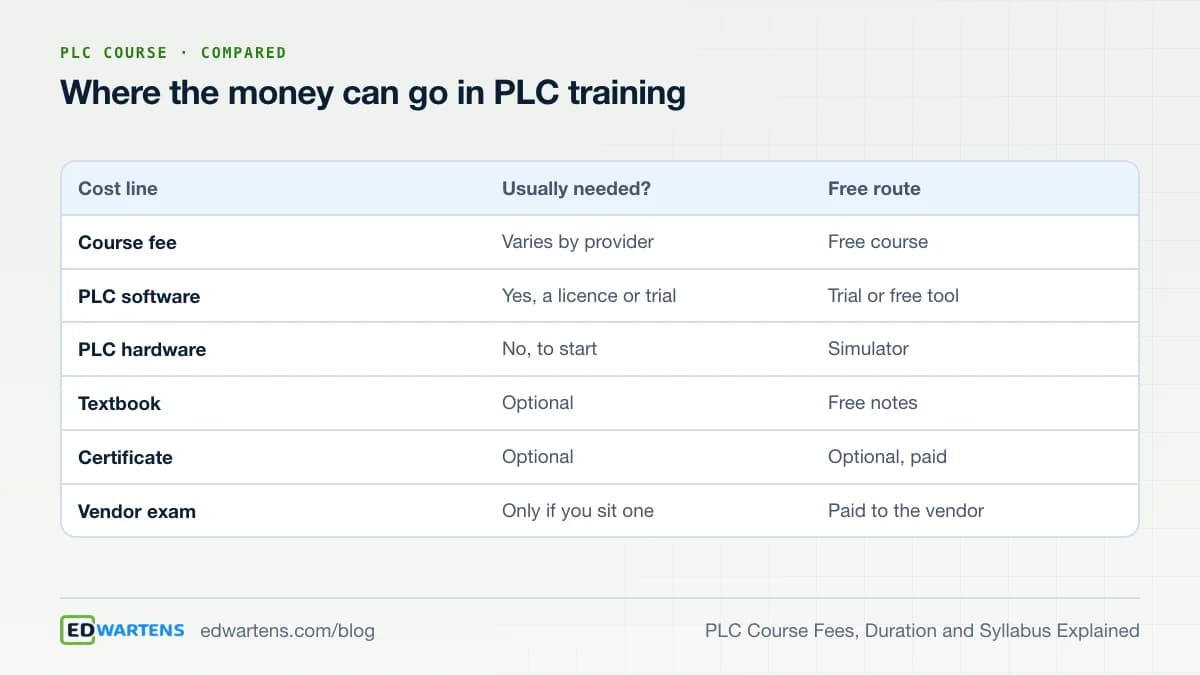
The software line deserves a note. Siemens offers a time-limited trial of TIA Portal, and our course notes describe a 21-day trial window with PLCSIM for simulation. If you need longer, the CODESYS development system and OpenPLC cost nothing to learn on. For Rockwell, the Allen-Bradley Studio 5000 course explains what software you need and what is free.
How long does a PLC course take?
For a beginner, 6 to 12 weeks is a realistic range for one brand, studied for 5 to 8 hours a week. That is a planning estimate, not a statistic, because the pace of learners differs widely. A worked example makes the arithmetic clear.
- At 6 hours a week for 8 weeks you spend 48 hours: about 16 hours on electrical and I/O basics, 20 on ladder logic and timers, and 12 on structure, an HMI screen and a project.
- At 4 hours a week the same plan runs 12 weeks.
- At 10 hours a week it fits in about 5 weeks, but revision time shrinks, so many people stretch it anyway.
Longer programmes exist, such as a multi-brand diploma that adds SCADA, drives and panel design. Their length is longer because they cover more, not because ladder logic takes longer to learn. If you want a plan with a week-by-week order, read how long it takes to learn PLC programming and how to learn PLC programming in 8 weeks.
What should a PLC course syllabus include?
Use the following table as a checklist when you read any syllabus. If a module is missing, ask where it is taught.
| Module | What you should be able to do afterwards |
|---|---|
| Electrical and field devices | Read a simple circuit, name sensors, switches and actuators |
| PLC hardware and I/O | Explain the CPU, input and output cards, and addressing |
| Ladder logic | Write start/stop seal-in logic and explain each rung |
| Timers and counters | Use on-delay, off-delay and counters in a real sequence |
| Compare and math | Compare values and do simple calculations |
| Analog signals | Scale a 4-20 mA signal to an engineering value |
| Program structure | Split a program into reusable blocks |
| HMI and communication | Build one screen and connect it to the PLC |
| Simulation and fault finding | Test a program and find a fault by method |
IEC 61131-3 is the international standard for PLC programming languages, and PLCopen describes it as the basis of its work. It defines ladder diagram, function block diagram, structured text, instruction list and sequential function chart. Learn ladder first, since it is the language most maintenance teams read, then add structured text. For brand details, our guides on Siemens PLC training and Allen-Bradley PLC training show how the same syllabus looks on each platform.
Do you need hardware, and where do you practise?
You do not. Simulators let you run the same logic you would write for a real controller. The lab guides at the PLC simulator and the ladder logic simulator are free and run in a browser. For a vendor simulator, see our comparison of free PLC simulators. Hardware matters later, when you wire, test and commission real panels.
How do you judge a PLC course before you join?
- Check the module list. Does it match the table above, in a sensible order?
- Check the practice. Is there a task each week that you run in a simulator, with a way to check your answer?
- Check the finish. Is there a project, a final assessment and a certificate that others can verify?
- Check the claims. Be wary of a promised job, a promised salary or an approval that cannot be named and checked.
- Check the fee. Ask what it includes, and what you would pay extra for software, exams or hardware.
A free course lets you test all five points at no cost, which is the best argument for starting there. Our post on whether free PLC certificates are worth it says what employers actually look at, and the best free PLC courses with certificate compares the options.
Free or paid: what do you actually get?
The difference between a free and a paid PLC course is rarely the video lessons. Many paid programmes use the same public lessons and software. What a fee can buy is live teaching, a mentor who marks your work, a classroom with real hardware, and a schedule that keeps you turning up. Those are real benefits for some people, and a poor use of money for others. Decide which of them you need before you compare prices.
A free course gives you the syllabus, the practice tasks and the assessment, and leaves the discipline to you. If you struggle to study alone, add structure yourself: book two fixed sessions a week, study with a friend, and set a finish date. If you want someone to check your logic, post your program in a study group or use a guided project such as an internship. Paid options start to make sense when you need hands-on time with a real panel, live feedback on a long project, or a vendor exam that you want to sit.
What gaps appear in many PLC syllabi?
Even a good-looking syllabus can leave out the parts that matter on a job. Watch for four gaps. The first is fault finding: a course that only teaches you to write new programs, never to read someone else's program online and find a fault, leaves you weak at the most common task in maintenance. The second is documentation, such as tag lists, I/O lists and simple commissioning notes. The third is safety, meaning the difference between a stop function and a safety function, and why an emergency stop is not handled by ordinary ladder logic alone. The fourth is a second brand: knowing how a Siemens program differs from an Allen-Bradley program shows you what is a concept and what is a vendor habit. If your syllabus lacks any of these, add a short course or a project to cover it.
Where does a free PLC internship fit?
After a course, you need a project. The free PLC internship is one place to build it. It is free to join, there is no application or interview, you start on any date, and the length is yours to choose from one week to 24 months. It is training, not employment, and no stipend is paid. Documents such as the certificate are optional paid add-ons, shown before you pay and verifiable at /verification. Whether your university gives credit for it is the university's decision. See all the engineering internships or the free internships.
A simple way to decide
If your question is only 'how much', the honest answer is 'compare what is included', and the cheapest good option is a free course with a simulator. If your question is 'how long', plan for 6 to 12 weeks for one brand. If your question is 'what', use the syllabus table and ask for a project. The free PLC courses hub lists every PLC course, and the PLC foundations path puts four of them in order. Start with one, finish it, and then decide whether you need anything paid at all.
Practise for free
Free PLC Programming Internship
Learn, practise and get documents you can verify; no fee to join.
See the internshipTake the free course


Questions
How much does a PLC course cost?
It varies by provider, from free online courses to paid classroom programmes, so compare what each fee covers. EDWartens PLC courses are free to join. The certificate is optional and paid, with the price shown in your currency before you pay.
How long is a PLC course?
A beginner course on one PLC brand usually fits in 6 to 12 weeks at 5 to 8 hours a week. Longer programmes add several brands, SCADA and panel work. Your pace matters more than the label, so choose a course you can finish.
What is in a PLC course syllabus?
A good one covers electrical basics, PLC hardware and I/O, ladder logic, timers and counters, analog scaling, program structure, an HMI screen and fault finding. Look for a project at the end, because a working project is the proof of learning.
Do I need to buy a PLC to learn?
No. Simulators such as PLCSIM, the CODESYS soft PLC and OpenPLC run on a laptop. Real hardware helps later for wiring and commissioning, but it is not needed to learn the logic.
Is a free PLC course as good as a paid one?
Quality depends on the syllabus, the practice and the feedback, not on the fee. Check the module list, whether there is a simulator task each week, and whether a certificate can be verified. Then judge by what you can build afterwards.
Sources
- PLCopen: IEC 61131, especially Part 3, the programming languages (page opened 17 October 2026)
- NPTEL: self-study courses from Indian institutes, over 3,200 listed (page opened 17 October 2026)
- ISA: standards and training for automation professionals (opened 17 October 2026)
Written by the EDWartens engineering team for general education. Product names are trademarks of their owners; mentioning them does not imply endorsement. Prices and terms of other providers were checked on the date shown and can change.

Ladder Logic Symbols: A Cheat Sheet with Examples
How to Choose a PLC Training Provider: A Checklist for Any Country
PLC Programming Languages: Which One to Learn First in 2026

How to Learn PLC Programming for Free, Step by Step

Virtual PLC Lab: Practise PLC Online in 3D, Free

PLC Counters CTU, CTD and CTUD Explained With a Video Demo