
To move a model from ETABS to SAFE, finish and check the ETABS model first. Export the floor or base level to an F2K text file, then import it into a new SAFE model. Verify the geometry, supports and loads before you design anything. The export carries geometry and loads, but not your ETABS property modifiers. This guide shows the options, a reaction check with real numbers, and a footing example.
CSI documentation was read on 1 November 2026. Menu names and options change between versions, so confirm them in the help for your release. Everything here is practice; a qualified structural engineer under local regulations is responsible for a real design.
Why engineers move a floor to SAFE
ETABS is built for the whole building: frames, walls, diaphragms and lateral analysis. SAFE is built for slabs, mats and footings. It models a slab as a plate on supports, designs strips and checks punching shear. It also models a mat or footing on soil springs. Most offices therefore analyse the building in ETABS and design a flat slab or a foundation in SAFE.
The two programs come from the same company, so the transfer is smooth. The risk is trusting it blindly. A transfer is not a validation, and every error you carry across will look neat on a nice plot.
The export options in plain words
CSI's Import ETABS into SAFE FAQ describes three export choices. The names below are paraphrased, so match them to the wording in your version.
| Option | Use it when | What SAFE receives |
|---|---|---|
| Floor loads | Most gravity floors | Geometry and loads on that floor |
| Floor loads and loads from above | Transfer floors and foundations | Floor loads plus loads from above in a separate pattern |
| Floor loads plus column and wall distortions | Temperature effects | Supports with imposed deformations |
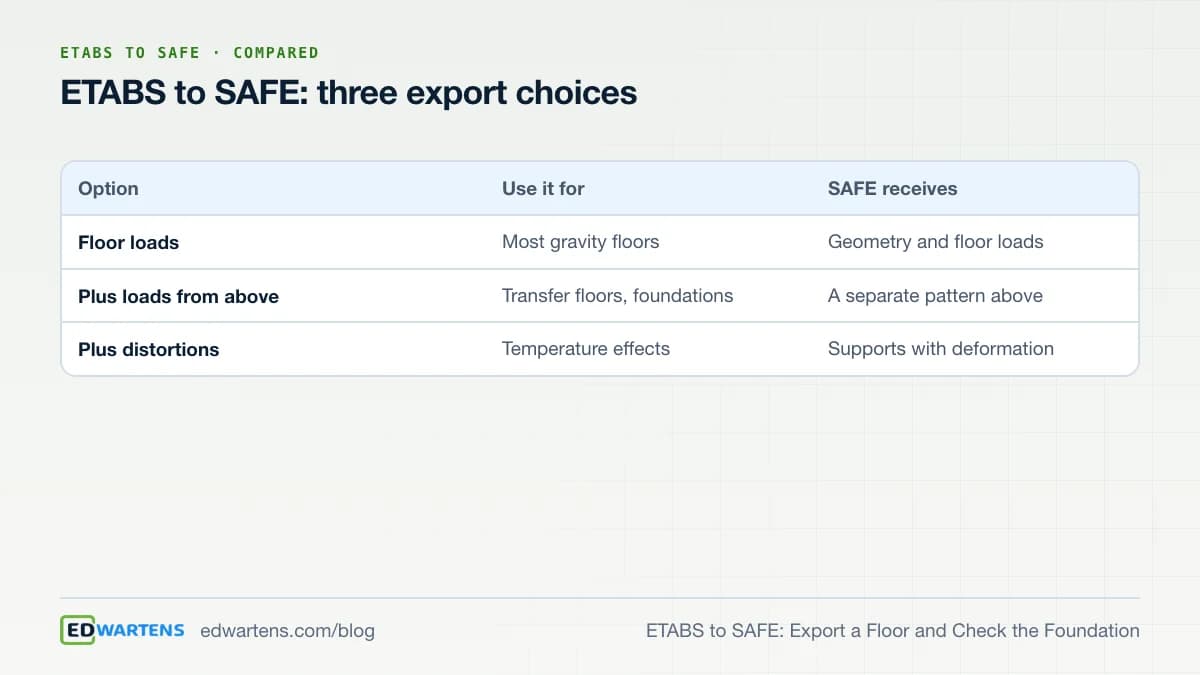
For a foundation you normally want the second option. The loads from the storeys above arrive as their own load pattern, for example Dead_Above, so you can see what the floor carries and what the columns deliver.
What does not travel
The same CSI page lists what to expect. Property modifiers assigned in ETABS are not exported, so cracked stiffness must be set again. Columns above the exported level are not exported. Uniform load sets are not exported, and beams receive a small torsional modifier so they do not create a torsional load path. The course notes add that you define design strips again in SAFE.
Because of this, treat SAFE as a new model that starts from your geometry. Check the slab thickness and material, and set the design code. The free ETABS and SAFE course uses ACI 318-19 with ASCE 7-22, and SAFE 23 also offers ACI 318-25 slab design. State the code family in your calculation and use one family per job.
Step by step
- Finish the ETABS analysis and check its base reactions against hand loads.
- Choose the level and the load cases to export, and name the file after the model revision.
- Export, then import the F2K file into a new SAFE model.
- Check the outline, columns, openings and supports against the drawings.
- Sum the SAFE reactions and compare them with the ETABS values.
- Set material, slab properties and the code, then define design strips.
- Run, review punching and deflection, and record what you changed.
Worked example: reconcile the reactions
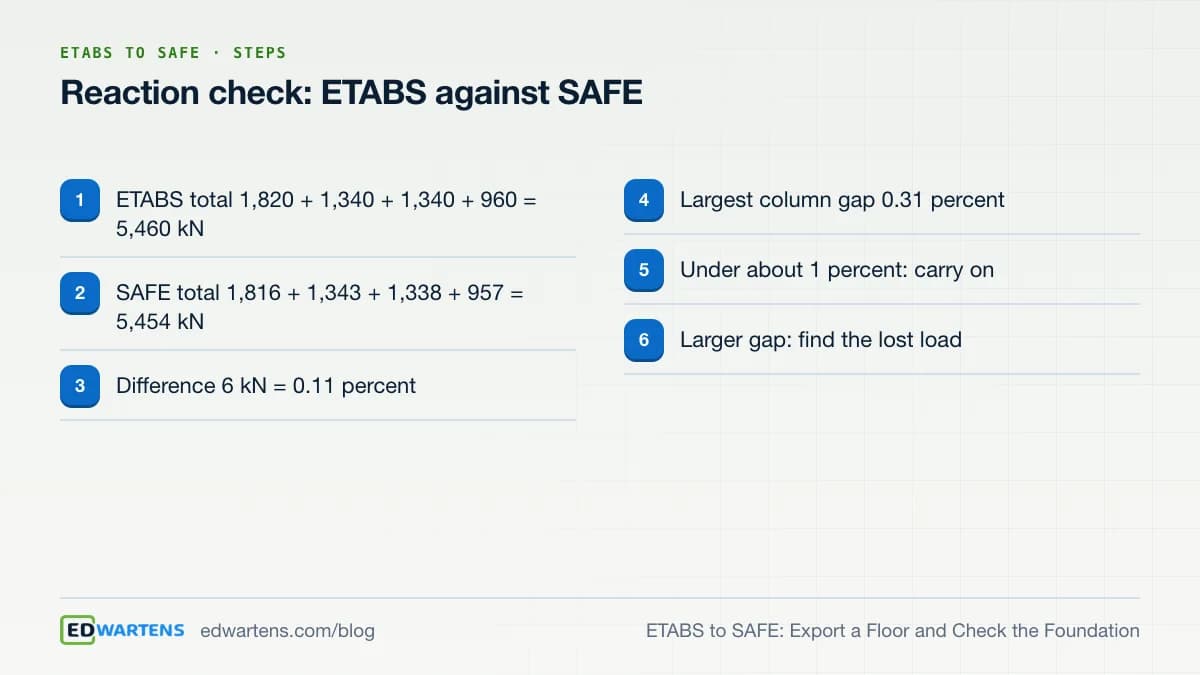
Here is a worked example of the check in step 5. Four columns on a level carry vertical loads from the dead load case. In ETABS the reactions are 1,820, 1,340, 1,340 and 960 kN. After the import, SAFE reports 1,816, 1,343, 1,338 and 957 kN.
- The ETABS total is 1,820 + 1,340 + 1,340 + 960 = 5,460 kN.
- The SAFE total is 1,816 + 1,343 + 1,338 + 957 = 5,454 kN.
- The difference is 6 kN, which is 6 / 5,460 = 0.11 percent.
- The largest single-column difference is 0.31 percent, at the 960 kN column.
A total within about one percent, and no single column far off, is a good sign. Different stiffness assumptions explain small differences in how load is shared. A large gap in the total means a load did not transfer, and you must find it before you go on.
| Column | ETABS (kN) | SAFE (kN) | Difference |
|---|---|---|---|
| A | 1,820 | 1,816 | -0.22 percent |
| B | 1,340 | 1,343 | +0.22 percent |
| C | 1,340 | 1,338 | -0.15 percent |
| D | 960 | 957 | -0.31 percent |
| Total | 5,460 | 5,454 | -0.11 percent |
Worked example: size a footing and estimate settlement
Take one column with 1,200 kN of service dead load and 600 kN of service live load. The geotechnical report gives an allowable bearing pressure of 150 kPa and a subgrade modulus of 24,000 kN/m3. These are example inputs; a real project takes both from the geotechnical report.
- Service load is 1,200 + 600 = 1,800 kN.
- Required area is 1,800 / 150 = 12.0 m2, a square of 3.464 m. Round up to 3.5 m, which gives 12.25 m2.
- Service pressure is 1,800 / 12.25 = 146.9 kPa, below 150 kPa.
- The spring settlement is pressure over modulus: 146.9 / 24,000 = 0.00612 m, which is 6.1 mm.
- The factored load for the concrete design is 1.2 x 1,200 + 1.6 x 600 = 2,400 kN.
- The factored pressure is 2,400 / 12.25 = 195.9 kPa.
Use service loads to size the footing and estimate settlement, and factored loads to design the reinforcement. Mixing them is a common mistake. SAFE needs the soil modulus as an input, and settlement from a simple spring ignores load spreading and layered soil, so it is a screening number only.
Prepare the ETABS model first
A clean export starts in ETABS. Name the load patterns clearly so you can find them in SAFE, and check that the base level and any transfer levels are the ones you mean to export. Run the analysis and compare the total base reaction with the hand total of floor area times load. If ETABS is wrong, SAFE will inherit the error.
Decide too what you want SAFE to do. A flat slab design needs the floor loads and the column positions. A mat or footing design needs the loads from above, because the foundation carries every storey. A temperature study needs the third option. Choosing the option before you export saves a second round of work.
When the design changes
Designs change. CSI's FAQ describes how to update loads without rebuilding the SAFE model. Import the updated F2K file as a new SAFE model, then bring the new loads into the original model through the database tables. You can also export the whole model to database tables, edit them and import them again. Whichever route you use, record the ETABS revision beside the SAFE file, and rerun the reaction check.
Common mistakes
Engineers often export from a model that has not been checked. Others forget that the F2K file is a snapshot, so a later change in ETABS does not reach SAFE until you update the load. CSI's page explains how to import the new file as a new model and bring the loads across. Another frequent error is leaving a core or shaft covered by slab load, so draw openings as holes.
For a wider view of presenting your work, see our guide to engineering portfolios from course projects. To keep a self-paced plan on track, read how to finish a free online engineering course.
Software and licences
CSI's system requirements page lists Windows 10 or 11, 64-bit, with at least 16 GB of RAM for ETABS. CSI's SAFE product page describes the program for floor systems. CSI notes that standalone and network licences are no longer supported, so a sign-in licence is needed. We do not link to cracked or free-download copies.
Learn the workflow free
The ETABS and SAFE Building Design course walks through the export, strips, punching shear and deflection with hand checks. It is a free course with a verifiable certificate of completion, which anyone can check on our verification page. It is not a CSI certification, and EDWartens is not affiliated with CSI.
Practise with us
Internships
Project work you can show
Free internships, 4 weeks each, with a free certificate. Premium is optional.
See all internshipsRoles
Mechanical and CAD
Roles that ask for this skill, 59 open in this country now. Free to see and to apply. We are not a recruitment agency.
See rolesTake the free course



Questions
How do I export an ETABS model to SAFE?
Finish and check the ETABS model, choose the level and load cases, and export the floor to an F2K text file. Import that file into a new SAFE model, then check geometry, supports and loads before designing.
What does ETABS not export to SAFE?
According to CSI, property modifiers, columns above the level and uniform load sets are not exported. Design strips and slab design settings are defined again in SAFE.
Which export option should I use for a foundation?
Usually the option that includes loads from above. It sends the floor loads plus the loads from the storeys above in a separate load pattern, so you can see what the columns deliver.
How do I check that the import worked?
Sum the vertical reactions in SAFE and compare them with the ETABS values for the same case. A total within about one percent is a reasonable sign. A larger gap means a load was lost or doubled.
Should I size a footing with service or factored loads?
Size the footing and check bearing and settlement with service loads. Use factored loads to design the concrete and reinforcement.
Can software output replace hand checks?
No. Software output must be checked by hand, and a qualified structural engineer is responsible for any real design.
Sources
- CSI Wiki: Import ETABS into SAFE FAQ (read 1 November 2026)
- CSI: ETABS system requirements (read 1 November 2026)
- CSI: SAFE product page (read 1 November 2026)
Written by the EDWartens engineering team for general education. Product names are trademarks of their owners; mentioning them does not imply endorsement. Prices and terms of other providers were checked on the date shown and can change.

How Long Does It Take to Become a Construction Estimator?

How Long Does It Take to Learn STAAD.Pro? A Plan

QA vs QC in Construction: Who Checks What on Site

Free Machine Learning Course for Mechanical and Electrical Engineers

DCS Training: What a Distributed Control System Is and How to Learn One Free

IIoT Training: How Plant Data Gets From a PLC to a Dashboard, and How to Learn It Free